← Back to Brand Guides
Diletta Bello+ Espresso Machine

Diletta Bello+ Espresso Machine

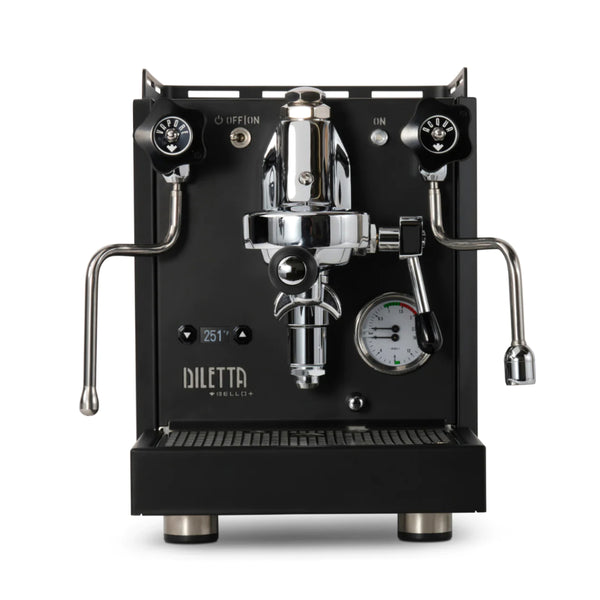
Bring a touch of technology to your classic espresso setup with the Diletta Bello+ Espresso Machine. Following the popularity of the original Bello, the Bello+ adds PID temperature control, an integrated shot timer, programmable pre-infusion, and a low-power eco mode—all with an aim to improve your shot consistency and overall machine usability. A PID controller puts instant access to temperature changes at your fingertips, and doubles as a shot timer when you lift the brew lever. The logic board behind the scenes also opens up programming options for pre-infusion (up to 10 seconds), and a new sub-boiling eco-mode that still seeks savings on energy consumption while offering vastly faster recovery times for your next shot. These upgraded features do not come at the expense of design, as the Bello+ retains the handcrafted steel build quality and simple manual controls of the Diletta Bello.

Warranty
2 Year Seattle Coffee Gear Warranty
What's In The Box
Double Portafilter, Bottomless Portafilter, Single Portafilter Basket, Double Portafilter Basket, Triple Portafilter Basket, Backflushing Basket, Tamper, Group Brush

Setup & First Use

Unboxing Your Diletta Bello+

  1. Before continuing, check the box for damage and punctures. If significant damage is noted to outer packaging, stop and call Seattle Coffee Gear Customer Service at 866-372-4734.
  2. Remove top foam packaging and set aside.
  3. Reach around the sides of your machine until you have a firm grasp of the machine base. Do not attempt to lift the machine by the cup rail.
  4. Lift carefully and set machine on countertop, ensuring all 4 legs make good contact.
  5. Remove the outer dust bag and accessory box; set aside.
  6. Save packaging for potential future use.

Initial Setup

  1. Check power cable and connector for kinks, then plug into the rear of the machine and into the wall socket.
  2. Locate the top water tank access hatch; remove the water tank.
  3. Rinse the water tank and fill with filtered water, then replace.
  4. Locate the power switch and turn the machine on. The PID display will illuminate.
  5. Open the hot water valve briefly to prime the system — allow water to flow for approximately 30 seconds into a container, then close the valve.
  6. Allow the machine to heat for a minimum of 20–25 minutes before your first use.
  7. Steam is available once fully warmed up — the HX boiler provides simultaneous brew and steam capability.

Brewing Your First Shot

  1. Perform a cooling flush: lift the brew lever and allow 3–5 seconds of water to flow into the drip tray, then lower the lever and wait 5–10 seconds.
  2. Remove the portafilter from the group head by turning it clockwise.
  3. Fill the portafilter with one or two doses of freshly ground coffee using the appropriate basket.
  4. Tamp the coffee firmly and evenly with the included tamper.
  5. Reinsert the portafilter into the group, turning it counter-clockwise until snug.
  6. Place your cups under the portafilter spouts.
  7. Lift the brew lever to start flow. The PID display will switch to a shot timer.
  8. Lower the lever to stop flow when you've reached your target yield.

Tutorials & Training

Adjusting Brew Temperature
The PID controller lets you set precise brew temperatures. With the machine on and idle, press and hold the brew button for 3 seconds to enter the temperature menu. Use the +/– controls to set your target, then confirm. Most espresso roasts perform well between 93°C–96°C (199°F–205°F). Lighter roasts generally benefit from higher temperatures; darker roasts from slightly lower. Allow 5 minutes for the boiler to stabilize after any change.

Using the Shot Timer
When you start the brew, the PID display automatically switches to a shot timer counting up in seconds. Your target is 25–30 seconds for a double shot. If your shot runs long, grind coarser. If it runs short, grind finer. The timer resets when you stop the brew.

Adjusting Brew Pressure (OPV)
The Bello+ features an externally accessible OPV. The standard target is 9 bar. To adjust, use a pressure gauge portafilter or blind basket with gauge. Turn the OPV screw clockwise to increase pressure, counter-clockwise to decrease. Most users will not need to adjust from the factory setting.

Using Eco Mode
Eco Mode lowers boiler temperature(s) to reduce energy consumption while still allowing faster recovery to brew temperature. To toggle: press and hold the eco mode button for 3 seconds until the indicator blinks to confirm. Ideal for users who take long breaks between shots.

Programmable Pre-Infusion
Pre-infusion gently wets the puck before full brew pressure is applied, which can improve extraction evenness. Enter the PID programming menu and navigate to the pre-infusion setting. You can program up to 10 seconds. A 3–5 second pre-infusion is a good starting point. Set to 0 seconds to disable.

Steaming Milk

  1. Open the steam valve briefly to purge any condensed water before positioning your pitcher.
  2. Submerge the steam tip just below the surface of cold milk.
  3. Open the steam valve fully and stretch the milk by keeping the tip near the surface until it has expanded to your desired volume.
  4. Angle the pitcher to create a swirling vortex and heat to approximately 60–65°C / 140–150°F.
  5. Close the steam valve, remove the wand, and wipe immediately with a damp microfiber cloth.
  6. Purge the wand briefly to clear any remaining milk from the tip.

Dialing In Your Espresso
Dialing in is the process of adjusting grind size to achieve the right extraction. Start here:
• Dose: 18g in (standard double basket)
• Yield: 36g out (2:1 ratio)
• Time: 25–30 seconds

If your shot pulls faster than 25 seconds: grind finer.
If your shot pulls slower than 30 seconds: grind coarser.
Make one adjustment at a time. Use a scale to track yield consistently.

Cleaning & Maintenance

After Each Use

  • Wipe the steam wand immediately after steaming with a damp microfiber cloth, then purge briefly to clear the tip.
  • Remove the portafilter, knock out the spent puck, and rinse the basket under hot water.
  • Empty and rinse the drip tray as needed.

Weekly

  • Soak the portafilter and basket in a solution of espresso cleaner (such as Cafiza or Pallo Coffee Tool Cleaner) for 20–30 minutes, then rinse thoroughly.

Exterior Cleaning

  • Wipe down stainless steel and painted surfaces with a soft, dry microfiber cloth. Avoid abrasive pads or sponges.
  • For chrome surfaces and fittings, apply ammonia-free glass cleaner to a microfiber cloth and wipe — never spray directly onto the machine.
  • Keep liquids away from the PID display and any electrical controls when cleaning.

Troubleshooting

Machine won't turn on
Check that the power cable is fully seated and the wall outlet is functioning. If the machine still does not power on, contact SCG support at 866-372-4734.

Pump runs but no water flows from the group
The water tank may be empty or not fully seated. Remove, refill, and firmly reseat. If it persists, turn off the machine, wait 10 seconds, and try again.

Shot runs too fast (under 20 seconds)
Your grind is too coarse or dose too low. Grind finer and/or increase your dose. Ensure the coffee is tamped firmly — a loose tamp creates channels that allow water through too quickly.

Shot runs too slow (over 35 seconds) or won't flow
Your grind is too fine, dose too high, or tamp too hard. Grind coarser and check your dose. Inspect the shower screen and portafilter basket for clogging.

Steam pressure is weak or steam is mostly water
Allow additional heat-up time (2–3 more minutes) and try again. If steam is watery, purge the wand briefly before steaming to clear condensation. If the issue persists, contact SCG support.

Machine is leaking from the group head
A leak at the portafilter-to-group seal is usually a worn group head gasket. Inspect the rubber gasket in the group — if cracked, flattened, or visibly worn, it needs replacement. Contact SCG for assistance sourcing the correct 58mm replacement gasket.

PID is displaying an error or unusual reading
Turn the machine off and allow it to cool for 10 minutes, then restart. If the error persists, the temperature probe may need inspection. Contact SCG support for next steps.

Still having issues?
Contact Seattle Coffee Gear support at 866-372-4734 or support@seattlecoffeegear.com, Monday–Friday, 8am–5pm PST. Our team handles Diletta warranty service directly.

Videos

Diletta Bello+ with PID – What is a PID

A PID controller puts instant access to temperature changes at your fingertips, and doubles as a shot timer when you lift the brew lever. The logic board behind the scenes also opens up programming options for pre-infusion (up to 10 seconds), and a new sub-boiling eco-mode that still seeks savings on energy consumption while offering vastly faster recovery times for your next shot. These upgraded features do not come at the expense of design, as the Bello+ retains the handcrafted steel build quality and simple manual controls of the Diletta Bello.

About Diletta

Diletta

About Diletta

Engineered with performance, reliability, and usability in mind, Diletta is a collaboration between Seattle Coffee Gear and a veteran team of Italian designers. We built Diletta to offer a home espresso experience that’s accessible to new users and enthusiasts alike, all for a competitive price. Whether you’re looking for classic Italian design or something more modern, the first two releases under the Diletta brand have you covered. Diletta espresso machines also let you brew with confidence due to their solid construction and reliability. We hope you’ll love these world class espresso machines as much as we do!
Brand warranty information

What it Covers: Diletta Espresso Machines

Length:

  • Espresso Machines: 2 years parts

Warranty Point of Contact: Seattle Coffee Gear

Contact Information: 866-372-4734 or email us at warranty@seattlecoffeegear.com

Can SCG Repair? Yes, read more about our repair services

Back To Diletta Guides Shop Diletta