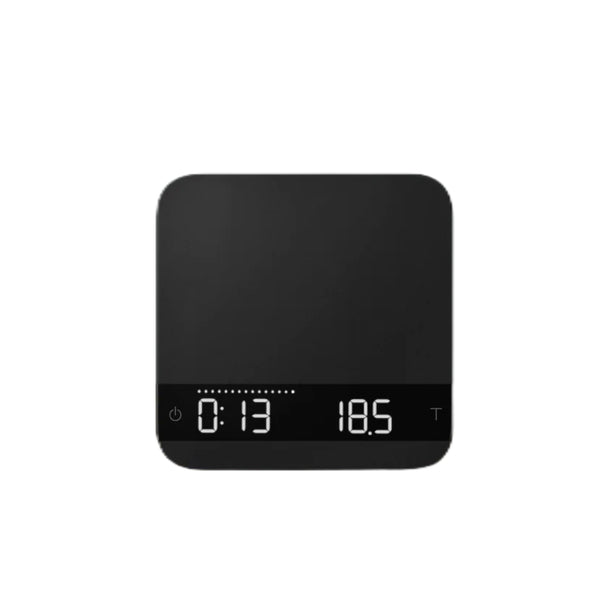
Understanding the Six Modes
The Lunar has six brewing modes. Press and hold the Power button while the scale is on to cycle through them. The active mode is indicated by icons on the LED display.
Mode 1 — Weighing Mode
Displays weight only in grams or ounces (0.1g readability). Use for general weighing tasks. Tare Save is supported in this mode: press and hold Tare for 2 seconds to save a container weight; press and hold for 0.5 seconds to subtract that saved weight from the reading.
Mode 2 — Dual Display Mode
Displays timer (left) and weight (right) simultaneously. Tap the Power button to start, stop, or reset the timer manually. Use for any timed brew where you want to start the clock yourself. Tare Save is also supported here.
Mode 3 — Timer Starts with Flow (Droplet icon)
The timer starts automatically the moment the Lunar detects the first drip of espresso flow, and stops when flow ceases. Place a cup on the scale, tare manually with the Tare button, then pull the shot. Best for hands-free shot timing where you want to capture only the extraction time.
Mode 4 — Auto-Tare, Timer Starts with Flow (Droplet + Square icons)
When a stable weight is placed on the scale (your cup), the scale auto-tares. The timer then starts automatically when espresso flow is detected, and stops when flow stops. Ideal for workflow where you set the cup and walk away — no button presses needed.
Mode 5 — Auto-Tare, Auto-Start Timer (Triangle + Square icons)
The scale auto-tares when a stable weight is placed on it, then immediately starts the timer. Use this mode to capture the full shot time including pre-infusion. The timer stops when espresso flow stops. When the cup is removed after brewing, the display flashes the final beverage weight and average flow rate.
Mode 6 — Auto-Tare Only (Square icon)
The scale auto-tares when a stable weight is placed on it, with no timer. Pull your shot normally. When the cup is removed, the brewing summary (final weight and average flow rate) is displayed briefly.
Flow-Rate Indicator
An LED bar across the top of the display visualizes real-time espresso flow rate from 0.1 g/s (left) to 3.4 g/s (right). During a brew, a single bright LED marks the peak flow rate reached so far. When the cup is removed after brewing, the display flashes between the final beverage weight and the average flow rate for that shot. The Flow-Rate Indicator can be enabled or disabled in the Configuration menu (FLorAtE.d setting).
Tare Save
In Modes 1 and 2, you can save the weight of a frequently used vessel. Place the empty vessel on the scale and press and hold Tare for 2 seconds to store its weight. To subtract that stored weight in future, press and hold Tare for 0.5 seconds — the scale will display the net contents weight.
Configuration Menu
With the scale powered off, press and hold the Power button until the display shows [ ACAIA ] then [ SEt ]. Release. Tap Tare to navigate settings, press and hold Tare to enter and confirm a setting. Key settings include Sleep Timer (default 5 min), Brightness (1–4), Battery Saving (display dim delay), Key Sound (beep on/off), individual Mode on/off toggles, Flow-Rate Indicator style, Auto-Reset delay, Weighing Filter (Fast/Normal/High), and Bluetooth on/off. To reset all settings to factory defaults, navigate to [ rESEt.d ] and select Yes.
Connecting to the Acaia App
Download the Acaia app (iOS or Android) and enable Bluetooth on your phone. Power on the Lunar — it will broadcast automatically when Bluetooth is enabled in settings. Use the app to log brews, adjust settings remotely, update firmware, and view historical shot data.