
All Brand Guides + −
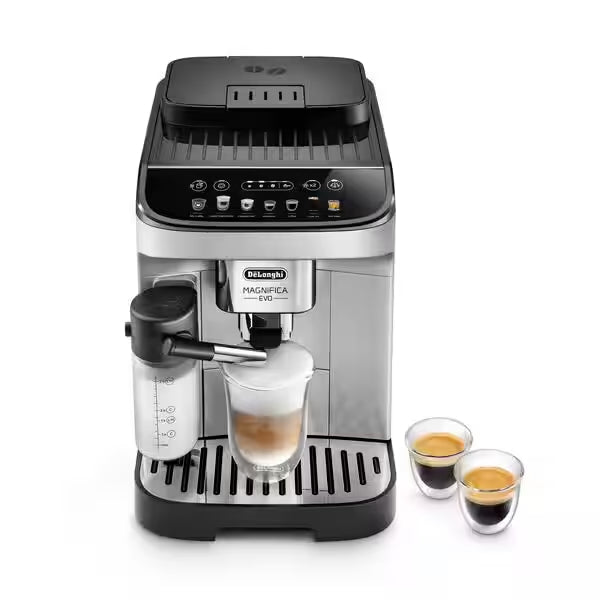
DeLonghi Magnifica Evo ECAM29084SB Superautomatic Espresso Machine
View Product Page|DeLonghi_Magnifica_Evo_ECAM29084SB_User_Manuals.pdf
Make your mornings a little more magnificent with the DeLonghi Magnifica Evo Superautomatic Espresso Machine. A just-right pick for small households, the Magnifica Evo can brew for two with a dedicated 2x button. Equipped with a milk carafe for one-touch lattes, programmable touch buttons, and even an over-ice option; the Magnifica Evo comes ready to brew espresso, cappuccinos, and more.
Additional Files
Setup & First Use
Before using the Magnifica Evo for the first time, wash all removable accessories that contact water or milk with warm water. Place the machine on a stable, flat surface with at least 1.2 inches of clearance on the sides and rear, and at least 6 inches above the machine. The Magnifica Evo operates at 120V / 1250W — plug into a grounded outlet only. Do not use the machine outdoors.
Installing the Hot Water Spout
Before first use, ensure the hot water spout is fitted to the accessory connector on the front of the machine. Hot water cannot be dispensed without it in place.
Filling the Water Tank
Remove the water tank from the left side of the machine, fill with fresh cold water to the MAX line, and reinsert. Never use mineral water, sparkling water, or hot water in the tank.
Filling the Bean Hopper
Open the bean hopper lid and fill with whole roasted coffee beans. Never add green, caramelized, or candied beans — these can stick to the grinder and make it unusable. Do not add ground coffee, instant coffee, or any other substance to the bean hopper.
Initial Water Circuit Fill
Connect the power cord and switch the machine on using the ON/Standby button (B1). The No Water indicator (C2) will light up. Place a container under both the coffee spouts and the hot water spout. Press and hold the X2 button (B2) — the internal water circuits begin filling and hot water will flow from the hot water spout, then from the coffee spouts. When the flow stops completely, the machine is ready for use. Note: the machine may be noisy during this initial fill as the circuits are empty — this is normal.
Setting Water Hardness
Setting water hardness as soon as possible allows the machine to accurately schedule descaling reminders. Dip the included Total Hardness Test strip into a glass of water for one second, remove it and shake lightly, then wait one minute. Count the number of red squares that appear (1 = Low, 2 = Medium, 3 = Medium/High, 4 = High). Enter the settings menu to save the correct level.
Installing the Water Softener Filter
Run water through the hole in the center of the filter for more than one minute until water exits the side openings. Then submerge the filter completely in the full water tank for about ten seconds, tilting it and applying light pressure so air bubbles escape. Insert the filter into the filter housing and press firmly home. Close the tank, refit the hot water spout, and place a container under the spout. Access the settings menu to register the new filter, then press the Clean/Rinse button (B6) — the machine will dispense hot water to activate the filter, then stop automatically.
Tutorials & Training
Brewing a Drink
Place a cup under the height-adjustable coffee spouts — lower the spouts as close to the cup as possible for a creamier, better-crema espresso. Select your preferred intensity using the intensity selection buttons (B4): Mild, Medium, or Strong. Then press the desired drink button (B7). Preparation begins automatically and stops when the programmed volume is reached.
Available Drinks and Default Volumes
- Espresso: 40mL (programmable 20–180mL)
- Coffee: 180mL (programmable 100–240mL)
- Long: 160mL (programmable 115–250mL)
- Doppio+: 120mL double espresso (programmable 80–180mL)
- Americano: 40mL espresso + 110mL water (each independently programmable)
- Long Black: 120mL water + 80mL espresso (each independently programmable)
- Over Ice: 100mL concentrated extraction (programmable 40–240mL) — place ice in the glass first
- Hot Water: 250mL (programmable 20–420mL)
Making Two Cups at Once
Place two cups under the coffee spouts, press the X2 button (B2) so its LED lights, then press the Espresso button. The machine will prepare two espresso shots simultaneously.
Using Pre-Ground Coffee
Press the pre-ground selection button (B3) — its LED lights up. Add one level measure of pre-ground coffee to the funnel. Never add more than one measure, and never add pre-ground coffee when the machine is off. Only one cup can be prepared per pre-ground dose. Select the desired drink to begin.
Adjusting Coffee Strength
Press the intensity button (B4) to cycle between Mild, Medium, and Strong before selecting a drink. The machine remembers the last intensity setting. In the event of a power failure, the machine reverts to Medium.
Adjusting Grind Size
The grind adjustment dial is on top of the machine inside the bean hopper. It should only be adjusted while the grinder is actively running during the first phase of coffee preparation — adjusting it when stopped can damage the grinder. Turn toward "1" for a finer grind (fuller bodied, creamier espresso); turn toward "7" for a coarser grind (faster flow, milder result). Changes take effect after at least 2 cups.
Customizing Drink Volumes
To save a custom volume for any drink: press and hold the corresponding drink button until its LED blinks rapidly — the machine enters programming mode and begins dispensing. When the cup is filled to your desired level, press the button again to stop and save. For milk-based drinks with two ingredients, press the button once more when the second component reaches the desired level.
Preparing Milk-Based Drinks
Fill the milk carafe container (E7) to the appropriate level for your chosen drink using the graduated scale on the carafe — reference marks show volumes for single and double latte macchiatos and cappuccinos. Secure the milk intake tube under the lid, close and lock the lid (turn toward the lock symbol), then attach the carafe to the machine connector with a firm push until you hear a beep. Place a cup under both the coffee spouts and the frothed milk spout, then select the desired milk drink. The machine handles everything automatically. Always use cold milk directly from the refrigerator (approximately 5°C/41°F) for best foam quality.
My Latte
My Latte delivers all the milk in the carafe followed by espresso, letting you control the milk quantity directly by how much you add to the container. Fill the carafe with the exact amount of milk you want, attach it, and select My Latte. Only the coffee volume can be programmed for My Latte; all milk in the carafe will always be dispensed.
Running a Manual Rinse
To clean and warm the internal coffee circuit at any time, press and hold the Clean/Rinse button (B6) for 5 seconds. Place a container of at least 100mL under the coffee spouts. The rinse cycle runs and stops automatically. If the machine has not been used for 3–4 days, run 2–3 rinse cycles before preparing drinks.
Settings Menu
Access the settings menu by pressing and holding the X2 button (B2) for 5 seconds. The active setting buttons illuminate. Settings available: Water softener filter status (installed/removed), Beep (on/off), Coffee temperature (Low/Medium/High), Energy saving mode (on/off), Water hardness (Level 1–4), Auto-off (15 min/30 min/1 hr/3 hrs). Press the ON/Standby button to exit the menu. The menu exits automatically after 30 seconds of inactivity.
Factory Reset
With the machine in standby (off but plugged in), press and hold drink buttons 1, 2, and the pre-ground button simultaneously for 5 seconds. The machine will emit a long beep and all indicator lights will blink to confirm the reset. All settings and programmed drink volumes return to factory defaults.
Cleaning & Maintenance
Important Safety Note
Do not use solvents, abrasive detergents, or alcohol on the machine. No chemical cleaning products are needed for routine maintenance on this De'Longhi superautomatic. Do not use metal objects to remove coffee deposits. Never immerse the machine in water. Before cleaning, turn the machine off and unplug it from the outlet, then allow it to cool.
Daily — Grounds Container and Drip Tray
Empty the drip tray daily. When the grounds container indicator (C4) lights up, the machine cannot make coffee until you empty and clean the grounds container. Remove the drip tray, empty it and clean it. Empty the grounds container and clean it thoroughly, removing all residue from the bottom. Check the red condensate tray and empty it if full. Reposition all components. Note: even when the grounds container is not full, the alert will activate 72 hours after the first coffee was prepared in the current cycle. For the 72-hour counter to work correctly, the machine must remain plugged in — do not unplug between uses.
Monthly — Coffee Spouts and Interior
Clean the coffee spouts regularly with a damp sponge or cloth. Check the holes in the spout — if any are blocked, clear them with a toothpick. Check the interior of the machine (accessible by removing the drip tray) approximately once a month. With the machine off and unplugged, remove coffee deposits using a brush and sponge, and vacuum out residues.
After Every Milk Use — Carafe Cleaning Cycle
After every milk-based drink, the Clean button LED (B6) will blink on the control panel. Leave the milk carafe attached — no need to empty it. Place a container under the milk spout and press the Clean button. Hot water and steam will flush through the milk spout automatically. If multiple milk drinks are being prepared in succession, run the cleaning cycle after the final drink. If enough milk remains for further drinks, run the clean cycle, then remove the carafe and refrigerate immediately. Milk can remain in the sealed carafe in the refrigerator for no more than 2 days. If the carafe is left out for more than 30 minutes, fully disassemble and wash all components.
Regular — Thorough Milk Carafe Cleaning
Disassemble the milk carafe fully: unlock and remove the lid, pull out the milk intake tube, rotate the milk spout 90° and pull to detach, then press the release button to separate the connector. Rinse all components under hot water (at least 40°C/104°F), then wash in the dishwasher on the top rack at 50°C — or by hand in hot soapy water for at least 30 minutes, then rinse thoroughly. Pay particular attention to the air channel in the carafe connector (E6) — clean it with a toothpick if milk residue is present. Dry all components before reassembling. The milk container itself is also dishwasher-safe.
Infuser Cleaning
Turn the machine OFF and remove the water tank. Open the infuser door on the right side of the machine. Press the two colored release buttons inward and pull the infuser out. Soak it in water for 5 minutes, then rinse under the tap. Use water only — no detergent, no dishwasher. Use a brush to clean any coffee residue from the infuser housing visible through the open door. Slide the infuser back in and press firmly until it clicks into place, then confirm the two colored buttons have snapped back out. Close the door and replace the water tank.
Water Filter Replacement
Replace the water softener filter when the filter indicator (C1) lights up, or after 2 months — whichever comes first. If the machine is unused for 3 weeks, replace the filter regardless of the indicator. Activate the new filter before installing by running water through its center hole for over one minute. Register the new filter in the settings menu and run the Clean button activation cycle. If you choose to use the machine without a filter, this must be registered in the settings menu as "Removed" or the machine will continue to prompt for filter maintenance.
Descaling
Descale when the descaling indicator (C5) lights up on the control panel. Use only De'Longhi Ecodecalk — third-party descalers can cause damage not covered by warranty. If the water softener filter is installed, remove it before adding descaler, and reinstall it at the start of the second rinse (Step 3). The descaling cycle has three steps and takes approximately 30 minutes — it cannot be interrupted once started. You will need a container of at least 2 liters and a full 100mL bottle of descaler.
To start: press and hold the descaling button (B5) for 5 seconds until the LED blinks rapidly. The process guides you step by step — empty and refill the water tank at each prompt, and press the blinking button to advance to the next stage. After the second rinse completes, the pre-ground indicator LED will illuminate to confirm the cycle is complete. Empty the drip tray and grounds container (which will contain rinse water), refill the tank with fresh water, and the machine is ready for use.
Troubleshooting
No Coffee Dispensing / Machine Not Starting
Check the water tank is full and properly seated — if the tank is present but misaligned, the valves won't open. Confirm the machine has completed its start-up warming cycle (drink LEDs stop blinking and remain steady). If the grounds container indicator is lit, empty and clean the container before the machine will brew again.
Coffee Too Weak or Not Creamy
The grind is too coarse. Turn the grind dial one click toward "1" while the grinder is running. Allow at least 2 cups before evaluating. Also verify the beans are fresh — coffee that has been in an open bag too long loses its oils and produces flat, pale crema. Use espresso-grade beans for best results.
Coffee Flowing Too Slowly or Drop by Drop
The grind is too fine. Turn the grind dial one click toward "7" while the grinder is running. Evaluate after 2 cups. If the coffee is barely flowing, the grind may be significantly too fine — turn 2–3 clicks coarser.
Coffee Not Hot Enough
Prewarm cups before brewing by rinsing them with hot water from the machine's hot water function. Run a manual rinse cycle (hold Clean button for 5 seconds) to warm the internal circuits if more than 2–3 minutes have elapsed since the last coffee. Alternatively, raise the coffee temperature setting in the settings menu.
Coffee Dispensing from Only One Spout
The coffee spout holes may be blocked. Clean both spouts with a damp cloth and clear any blocked holes with a toothpick.
Watery Coffee Output
The pre-ground coffee funnel is likely clogged. Open the infuser door and clean the funnel with the included brush.
Milk Foam Has Large Bubbles or Splashes
Milk that is not cold enough is the most common cause — always use milk directly from the refrigerator at approximately 5°C/41°F. Also disassemble and thoroughly clean the milk carafe lid and connector (E6), paying close attention to the air channel in the connector. If using plant-based milk, try a "Barista" formulation for better foam stability.
Milk Drinks Not Working / Milk Not Dispensing
Check that the milk carafe is fully attached — the machine should emit a beep when the carafe is correctly connected. Confirm the carafe connector (E6) is properly inserted into the lid. If multiple milk drinks have been prepared back-to-back, the machine may need a few moments to heat to the correct temperature before milk drinks are re-enabled.
Grounds Container Alert Won't Clear
Remove the drip tray, thoroughly clean and dry the grounds container (scrub the bottom to remove all settled residue), and reassemble while the machine is on. The counter resets automatically when the container is properly reseated with the machine powered on. The 72-hour timer resets with cleaning — keep the machine plugged in between uses for the timer to work correctly.
Infuser Cannot Be Removed
The machine must be turned fully off (not just in standby) before the infuser can be removed. Press the ON/Standby button to power off, then open the infuser door.
Descaling Cycle Requesting a Third Rinse
During one of the two standard rinse steps, the water tank was not filled to the MAX level. Restart from Step 3 (Second Rinse) to ensure all descaler solution is fully flushed from the internal circuits.
Still Need Help?
Contact De'Longhi Consumer Support at 1-800-322-3848 or visit delonghi.com.
About Delonghi

About Delonghi
Brand warranty information
⚠ WARNING: Cancer and Reproductive Harm - www.P65Warnings.ca.gov
What it Covers: DeLonghi espresso machines, coffee makers and grinders
Length: 1 Year (NEW Small espresso machines, capsule machines, coffee makers, grinders and other electronics), 2 Years (NEW Superautomatic espresso machines), 6 Months (Refurbished Espresso Machines)
Who Supports the Warranty: DeLonghi
Warranty Contact Information: 800-322-3848
Eligible for SCG Extended Warranty? No
Can SCG Repair? Yes (Superautomatic espresso machines only). Read more about our repair services.