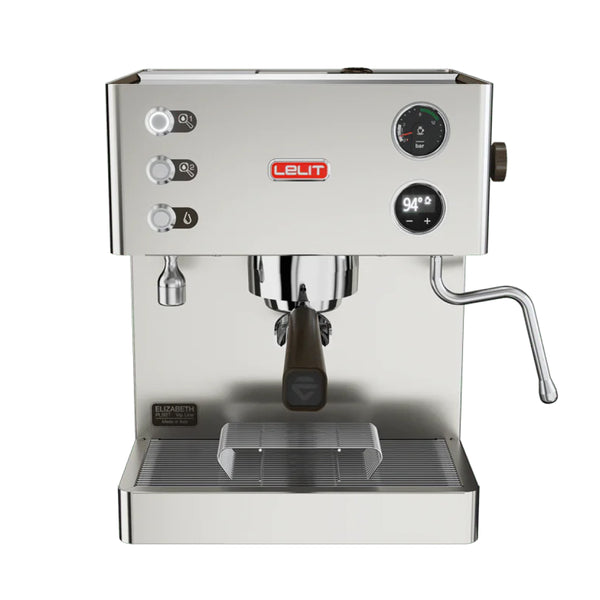
The Dual Boiler Advantage
The Elizabeth's defining feature is its two completely independent boilers: a 300ml brass coffee boiler dedicated solely to brewing, and a 600ml stainless steel (316L) boiler dedicated to steam and hot water. Because steam pressure and brew temperature are controlled separately, you can steam milk and pull shots simultaneously without either function affecting the other. This thermal independence is the core advantage of a dual boiler machine at home.
Pulling a Shot — Step by Step
- Select the appropriate filter basket for your dose — the 1-dose basket for 7–9g, the 2-dose PLUS basket for 14–18g. Insert it into the filterholder.
- Dose your ground coffee into the filterholder and distribute evenly. Use the tamper to compress the grounds with firm, even pressure on a level surface.
- Insert the filterholder into the brewing group and rotate the handle clockwise until it aligns with the padlock symbol on the group — this locks it into place.
- Place your cup(s) under the spout. Press Button 1 for a single dose or Button 2 for a double dose. Extraction begins automatically.
- Watch the backlit manometer — extraction pressure should land in the green zone for optimal results. If pressure is too high, grind coarser; if too low, grind finer.
- Extraction stops automatically when the programmed time or volume is reached, or press the button again to stop manually.
Reading the Manometer
The pressure gauge on the front of the machine gives you real-time feedback during extraction. The green area indicates optimal extraction pressure. Consistently high pressure (above the green zone) typically means the grind is too fine, the dose is too large, or the tamp is too firm. Consistently low pressure means the grind is too coarse or the dose too low. Use the manometer as your primary dialing-in tool alongside shot timing and taste.
Programming Automatic Shot Time
The Elizabeth can be programmed to stop extraction automatically at a set time for each button independently, allowing repeatable, hands-free shots. To program Button 1: press it 3 times in succession, then when the shot is running, press Button 1 again at the moment you want it to stop — the time is saved. To program Button 2: press it 4 times in succession, then press Button 2 again at the desired stop point. After programming, shots will automatically stop at that time. To return to manual mode, hold the button during extraction until the display confirms the change.
Programming Pre-Infusion
Pre-infusion pre-wets the coffee puck with low-pressure water before the pump builds to full pressure, which can improve extraction evenness and reduce channeling — especially beneficial with lighter roasted, higher-altitude coffees. Pre-infusion time is programmable independently for each button via the LCC menu. When pre-infusion is active and a coffee button is pressed, the grounds are wetted for the programmed time before the pump engages at full pressure. The extended guide covers advanced pre-infusion modes including bloom pre-infusion and steam pre-infusion for more experienced users.
Economy Mode (Steam Boiler Off)
If you are only making black espresso and do not need steam, you can disable the steam boiler to reduce energy consumption. With the machine on and showing "OK," hold Button 2 for more than 3 seconds. The LCC display will show "E" to confirm economy mode is active — the steam boiler heating element is disabled. Hold Button 2 again for more than 3 seconds to re-enable the steam boiler. Economy mode is useful during long sessions between milk drinks or when you want to save energy.
Automatic Purge
The automatic purge is a cooling flush that brings the brew temperature down to optimal extraction temperature after the machine has been idle or after steaming. To activate: press both coffee buttons (Button 1 and Button 2) simultaneously. The pump will run briefly, flushing a small amount of water through the group. This is particularly useful after steaming, when residual heat in the group can cause the first shot to over-extract if not purged first.
Steaming Milk
Before steaming, purge the steam wand briefly by turning the steam knob counter-clockwise with the wand pointed at the drip tray — this expels any condensed water. Fill your milk jug to the base of the spout, no more. Submerge the steam wand tip just below the surface of the milk, open the steam knob, and introduce air by keeping the tip near the surface (a hissing sound indicates good air incorporation). Once you have stretched the milk to the desired volume, lower the wand tip below the surface to spin and heat the milk. When the jug reaches the desired temperature, close the steam knob. Wipe the steam wand immediately after each use and purge again briefly to clear any milk residue from inside the tip.
Hot Water
To dispense hot water from the fixed wand, press Button 4. Press Button 4 again to stop. The hot water wand is fixed — position your cup or vessel under it before pressing. Hot water from the fixed wand is drawn from the steam boiler and is at near-boiling temperature — use caution.
Standby Mode
After 30 minutes of inactivity, the Elizabeth enters standby automatically — the display and heating elements are disabled, and Button 1 flashes every 3 seconds. To wake the machine, press Button 1. Wait for the display to confirm "OK" before brewing. Standby can be disabled in the LCC settings if preferred.