
All Brand Guides + −
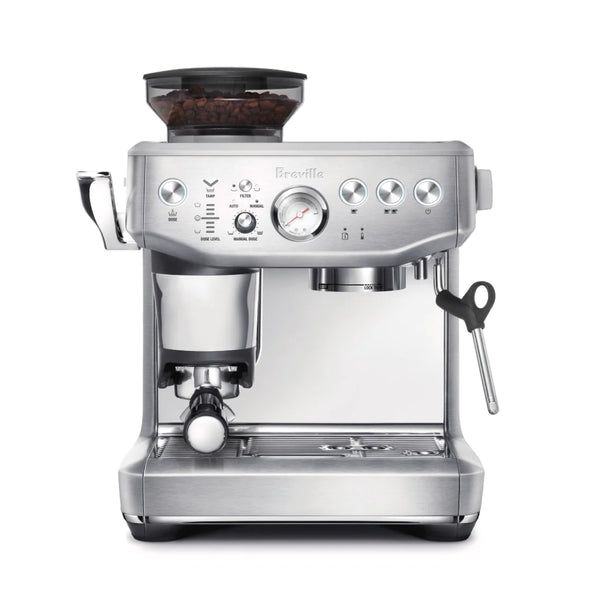
Breville Barista Express Impress Espresso Machine
View Product Page|Breville_Express_Impress_User_Manual.pdf
Impress your friends and family with the new Breville Barista Express Impress Espresso Machine. Built to make your all-in-one espresso experience even easier, the Impress offers brand new intelligent dosing and tamping technology that seeks to lower the learning curve for home espresso. This Impress system harnesses a 22-lb calibrated tamper alongside a basket depth sensor that learns and adapts dosing times for the perfect shot. Simply pull the lever and use the tamp monitor lights on the face of the machine to automatically dial in the right dose. The Barista Express Impress also packs in all the features Breville has become known for in their earlier machines, like a quick-heat thermoblock that manages brewing and steaming, programmable shot times, and a hot water spout for tea or Americanos. The Impress brings all the things you need to make excellent espresso right in your home kitchen.
Setup & First Use
Before using your Breville Barista Express Impress for the first time, remove all packaging materials and labels. Remove the water tank, portafilter, filter baskets, and milk jug and wash them with warm water and a gentle dish soap. Rinse thoroughly and dry before reassembling.
Installing the Water Filter
Remove the water filter and filter holder from their plastic bag. Soak the filter in cold water for 5 minutes, then rinse under cold running water. Insert the filter into the holder, then press the holder down into the water tank to lock it into place. Set the date dial to 3 months ahead as a replacement reminder. Breville recommends replacing the water filter every 3 months — or more frequently in hard water areas.
Filling the Water Tank
Ensure the bean hopper is locked into position before removing the tank. Fill the tank with cold tap water up to the MAX line. Do not use highly filtered, demineralized, or distilled water — this can affect flavor and machine performance. Press the tank back onto the machine until it seats properly. The machine will not operate if the water level is below the MIN mark.
Attaching the Hopper and Loading Beans
Insert the bean hopper into position on top of the machine and turn the dial to lock it. Fill with fresh whole beans. If the hopper is not correctly locked, the Filter button will flash between single and double basket to alert you.
First-Time Priming and Flushing
Press the POWER button. The button will flash for up to 55 seconds while the machine heats. Once the 1 CUP, 2 CUP, and POWER buttons illuminate steadily, the machine is at temperature. Before pulling your first shot, run the following flush cycle — repeat 3 times total:
- Place a cup under the group head and press 2 CUP to run water through the group head.
- Place a cup under the hot water spout, turn the dial to Hot Water, and run water for 10 seconds.
- Position the steam wand over the drip tray, turn the dial to Steam, and activate steam for 10 seconds.
- Discard the water in the cup and drip tray.
After 3 flush cycles, refill the water tank to MAX. Then insert the portafilter into the grinding cradle, press and hold the Dose button for 3 seconds to purge the grinder chute, and discard those initial grinds.
Grind Size Starting Point
The grind size dial has 25 settings. Breville recommends starting at setting 16 and adjusting from there. Rotate the dial toward the back of the machine for a finer grind, or toward the front for coarser. Only adjust grind size one step at a time, and note that grind changes take effect on the dose cycle after your next tamp.
Tutorials & Training
Understanding the Impress Puck System
The Barista Express Impress is built around Breville's Impress Puck system, which keeps the portafilter in the same position through grinding, dosing, and tamping to minimize mess. The machine doses automatically based on your last grind cycle, then signals when it's time to tamp via a flashing Tamp indicator light. The assisted tamp lever applies a consistent 22 lbs of pressure with a 7-degree barista twist finish. For a more polished puck, Breville recommends tamping twice. Do not put fingers into the tamping chute when pushing the lever down.
Reading the Dose Level Indicator
After tamping, the Dose Level Indicator bars on the machine tell you whether your dose is ideal, under, or over. The target is the middle bar. If the dose is below the middle bar, the machine enters "A Bit More" mode and the Dose button will flash — press it to add a small additional grind. If the dose is above the middle bar, remove the portafilter and use the included Razor precision trimming tool to level the puck. The machine will automatically adjust the next grind cycle based on the correction made.
Choosing Single Wall vs. Dual Wall Filter Baskets
The machine ships with both single wall and dual wall baskets in 1 CUP and 2 CUP sizes. Single wall baskets (recommended for fresh whole beans) allow you to dial in grind and dose for a more nuanced espresso. Dual wall baskets regulate pressure internally and are better suited for pre-ground coffee or beans past their 30-day roast date — they produce consistent pressure regardless of grind precision. Use the 1 CUP basket for 8–11g doses and the 2 CUP basket for 16–19g. If switching basket sizes, adjust your grind amount accordingly.
Pulling a Shot — Extraction Guide
Before inserting the portafilter, briefly press 1 CUP to flush the group head and stabilize temperature. Wipe any loose grinds from the basket rim, then insert the portafilter by aligning the handle at the INSERT position and rotating toward center until firm resistance is felt. Place pre-warmed cups under the portafilter and press 1 CUP or 2 CUP.
A well-extracted shot should begin flowing after 8–12 seconds and have the consistency of dripping honey. Use this as your guide:
- Flowing before 7 seconds: grind too coarse or dose too low — under-extracted. Go finer or add more coffee.
- Dripping but not flowing after 12 seconds: grind too fine or dose too high — over-extracted. Go coarser or reduce dose.
- Ideal shot time: 25–30 seconds total extraction.
Programming Shot Volume
To program your preferred shot volume for 1 CUP or 2 CUP: with the machine in standby, press and hold both 1 CUP and 2 CUP simultaneously for 3 seconds until they flash. Press 1 CUP to begin extraction and press it again when you reach your desired volume — that volume is now saved. Repeat for 2 CUP. To reset to factory extraction time, hold Filter + 1 CUP + 2 CUP for 3 seconds from standby.
Adjusting Brew Temperature
The default brew temperature is 200°F (93°C), adjustable ±4°F in 2°F increments. To adjust: turn the machine off, then press and hold Filter + 1 CUP + 2 CUP, then press and hold POWER. The machine will beep once and display the current temperature setting. Within 5 seconds, press 2 CUP to increase by 2°F, POWER to increase by 4°F, Manual Dose to decrease by 2°F, or Dose to decrease by 4°F. Two beeps confirm the change. Press 1 CUP to return to the default temperature at any time.
Texturing Milk
Start with cold, fresh milk filled between the MIN and MAX lines of the steel jug. Position the steam wand tip over the drip tray and turn the dial to Steam — wait until steam is flowing strongly, then turn back to Standby. Within 8 seconds, insert the steam tip 1–2cm below the milk surface at the 3 o'clock position, then turn back to Steam. Keep the tip just under the surface to create a clockwise vortex; lower the jug gradually to introduce air and build volume. Once sufficient foam is created, lower the tip deeper to heat the milk. Target temperature is 140–149°F (60–65°C) — the jug should be hot but still comfortable to hold. Turn the dial to Standby before removing the tip, then purge the wand briefly and wipe immediately with a damp cloth. Tap the jug on the counter to collapse bubbles and swirl to integrate before pouring.
Purging the Grinder Daily
Old grinds left in the burrs overnight can affect flavor. At the start of each day, press and hold the Dose button to purge the retained grinds. Release when done. Remove the portafilter, discard the purge grinds, and reinsert the portafilter to return to standby before beginning your normal dose cycle.
Cleaning & Maintenance
Important Safety Note
Always switch the machine off by pressing the POWER button and unplug it before cleaning or moving the machine. Allow the machine to cool fully before handling hot components. Do not immerse the machine, power cord, or plug in water. Do not use alkaline cleaning agents — use mild detergent only. No parts or accessories should be cleaned in the dishwasher.
Daily — After Each Session
- Steam wand: After every steaming session, turn the dial briefly to Steam to purge residual milk from inside the wand, then immediately wipe the outside with a damp cloth. If a hole in the steam tip becomes blocked, switch the machine off and cool it fully, then use the pin on the included cleaning tool to clear the blockage. If the tip remains blocked, remove it using the integrated spanner on the cleaning tool, soak in hot water, and unblock before reattaching.
- Portafilter and filter baskets: Rinse under hot water immediately after each use to remove coffee oils. If basket holes become blocked, use the pin on the cleaning tool to clear them. For stubborn blockages, dissolve a cleaning tablet in hot water and soak for approximately 20 minutes, then rinse thoroughly.
- Group head / shower screen: Wipe the group head interior and shower screen with a damp cloth to remove loose coffee particles. Periodically, place an empty basket and portafilter into the group head and press and hold 1 CUP to run a short water flush.
- Drip tray: Remove, empty, and clean whenever the drip tray full indicator is visibly floating. Remove the grill, lift the coffee grind separator, and dispose of any grounds. Wash all drip tray parts in warm soapy water with a soft cloth, rinse, and dry thoroughly.
- Exterior: Wipe the outer housing and cup warming tray with a soft, damp cloth, then polish with a dry cloth. Do not use abrasive cleaners or pads.
Cleaning the Tamp System
Remove the tamp cover. Using the cleaning brush, brush the tamp face and cradle clear of any ground coffee dust. Push the tamp lever fully down and hold it while brushing grinds from in and around the tamp mechanism. Slowly release the lever, making sure the brush is clear of the tamp area before releasing. Replace the tamp cover.
Cleaning Cycle (Group Head Backflush)
The CLEAN / DESCALE indicator will flash when a cleaning cycle is needed. To run it:
- Insert the 1 CUP filter basket into the portafilter, add the cleaning disc, then place one cleaning tablet on top.
- Lock the portafilter into the group head and place a large container beneath the spouts.
- Ensure the water tank is full of cold water and the drip tray is empty.
- Press POWER to turn the machine off.
- Press and hold 1 CUP + 2 CUP + POWER simultaneously for 3 seconds to begin the cycle.
- The cycle runs for approximately 5 minutes, intermittently flushing water to dissolve the tablet. No water should come through the portafilter spouts during this time.
- When complete, remove the portafilter and confirm the tablet has fully dissolved. If not, repeat from step 4.
- Remove the cleaning disc, reinsert the portafilter, and press 2 CUP to rinse the group head. Wipe any splashes with a soft dry cloth.
Cleaning the Conical Burrs
Regular burr cleaning helps maintain consistent grinding results. To clean: unlock and empty the hopper, relock the empty hopper, and run the grinder until empty. Then unlock the hopper and remove it. Unlock and remove the top burr and clean both the top and lower burr surfaces with the included brush. Remove the tamp cover and brush out the grinder chute. Replace the tamp cover and reassemble.
Replacing the Water Filter
Replace the water filter every 3 months (or more frequently in hard water areas). Soak the new filter in cold water for 5 minutes, rinse under cold running water, insert it into the filter holder, press it down to lock into the tank, and reset the date dial 3 months forward. Replacement filters are available at breville.com or through Seattle Coffee Gear.
Shower Screen Gasket Replacement
Over time, the silicone seal around the shower screen will need replacement. Switch the machine off, unplug, and remove the water tank and drip tray. Clean the center of the shower screen screw with a skewer, then use the short end of the included hex key to loosen the screw counterclockwise. Remove the screw and shower screen, wash the screen in warm soapy water, and dry. Remove the old silicone seal and insert the new seal flat-side first (ribbed side facing out). Reinstall the shower screen and screw, tightening until flush. Contact Seattle Coffee Gear or visit breville.com for replacement seals.
Storing the Machine
Before storing: press POWER to off, turn the steam dial to Standby, unplug, remove unused beans from the hopper, clean the grinder, and empty both the water tank and drip tray. Ensure the machine is cool, clean, and dry before storage. Store upright and do not place anything on top of the machine.
Troubleshooting
Machine Won't Start / No Response
Confirm the machine is plugged in and the power outlet is functioning. Check that the water tank is filled above the MIN line and is fully seated on the machine — the machine will not operate if water is below minimum. If the machine was in use and became unresponsive, allow it to cool and restart.
Dose Button Is Not Illuminated
The Dose button only illuminates when three conditions are met: the portafilter is fully inserted and secured in the grinding cradle, the bean hopper is locked in position, and the tamp lever is in the up (home) position. Check all three before pressing Dose.
Filter Light Flashing Between Single and Double
This indicates the bean hopper is not correctly locked into position. Remove and reinsert the hopper, turning the dial until it locks securely.
Espresso Flowing Too Fast (Under-Extracted)
If the shot begins flowing before 7 seconds, the grind is too coarse or the dose is too low. Adjust the grind size dial one step finer (toward the back of the machine) and pull another shot. Only change one variable at a time. Also confirm the tamp level indicator was at the ideal middle bar — a light tamp or under-dose will accelerate flow regardless of grind size.
Espresso Not Flowing or Flowing Too Slowly (Over-Extracted)
If the shot drips but doesn't flow after 12 seconds, the grind is too fine or the dose is too high. Move the grind size one step coarser. If an over-dose is showing on the Dose Level indicator, trim the puck with the Razor tool before extraction. Also check that the shower screen and filter basket holes are not blocked — a clogged basket severely restricts flow.
No Crema / Thin or Pale Shot
Poor crema is usually caused by stale beans (past 30 days from roast), grind too coarse, or insufficient dose. Try freshly roasted beans first. If using the single wall basket with older beans, switch to the dual wall basket, which regulates pressure internally and produces more consistent results regardless of bean freshness. Also confirm the basket is correctly seated in the portafilter and the portafilter is fully locked into the group head.
Coffee Grounds Leaking Around the Portafilter
Grounds on the basket rim prevent a proper seal. Always wipe the rim clean before locking the portafilter into the group head. Also check that the silicone shower screen gasket is not worn or damaged — a deteriorated seal will allow leaking. See the Shower Screen Gasket Replacement section above, or contact Seattle Coffee Gear for assistance.
Steam Wand Is Blocked or Producing Weak Steam
Turn the machine off and allow it to cool. Use the pin on the included cleaning tool to clear the blocked hole(s) in the steam tip. If still blocked, remove the tip using the integrated spanner on the cleaning tool, soak it in hot water, and clear the holes before reattaching. After each steaming session, always purge the wand and wipe immediately — dried milk is the most common cause of tip blockage.
Milk Won't Foam Properly
Start with cold, fresh milk — milk that has already been heated or is past its use-by date will not texture correctly. Confirm the steam tip is not partially blocked. Position the tip at 1–2cm below the milk surface at the 3 o'clock position and establish a vortex before introducing air. Do not heat milk above 149°F (65°C) — overheated milk loses its ability to hold foam structure. If milk is separating quickly after steaming, it was likely overheated.
CLEAN / DESCALE Light Is Flashing
A flashing CLEAN / DESCALE indicator means a cleaning cycle (group head backflush) is required. Follow the Cleaning Cycle steps in the Cleaning & Maintenance section above. This is distinct from descaling and uses the included cleaning tablets and disc.
Resetting Auto Dose Time
If the auto dose time has drifted significantly (after a major grind size change or an accidental double-dose), reset it from standby mode: press and hold Manual Dose + Filter for 3 seconds. The control panel lights will flash 3 times with beeps to confirm the reset, and the machine will return to standby with factory dose timing.
Still Need Help?
If you're experiencing an issue not covered here, contact Seattle Coffee Gear — our team is happy to help troubleshoot. For warranty repairs or service, you can also reach Breville directly at breville.com or their support center.
About Breville

About Breville
Brand warranty information
What it Covers: Breville espresso machines, grinders and blenders
Length: 2 Years (Covers Bambino Plus, Barista Pro, Barista Express Impress, Barista Touch, Barista Touch Impress, Dual Boiler, Dynamic Duo, Oracle, Oracle Touch, Oracle Jet, and Precision Brewers), 1 Year (Covers Bambino, Barista Express, Grind Control, Milk Cafe, and Smart Grinder Pro)
Who Supports the Warranty: Breville USA
Warranty Contact Information: 866-273-8455
Can SCG Repair? Yes (excluding Bambino models and grinders) Read more about our repair services.
Note: Please register your product with Breville for warranty support.