← Back to Brand Guides
Breville Variable Temperature Kettle

Breville Variable Temperature Kettle

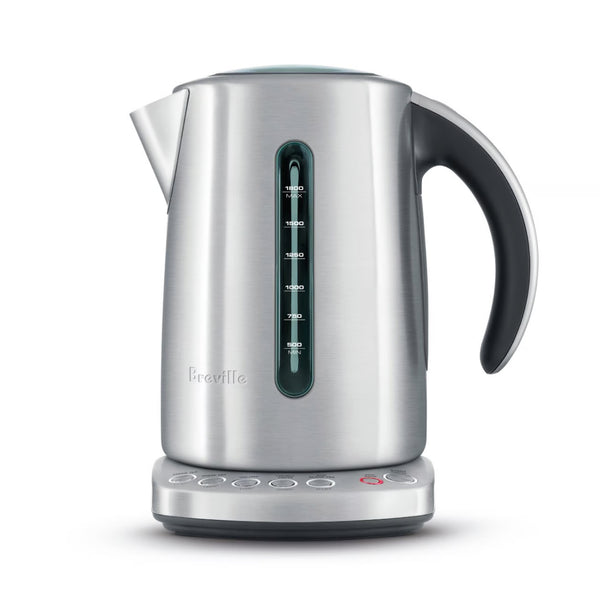
When a precise temperature matters, the Breville Variable Temperature Kettle is ready to meet all of your water-boiling needs. This 1500-watt electric kettle has five programmed brewing temperatures intended to craft perfectly warmed green tea (175&degF), white tea (185&degF), oolong tea (195&degF), French press (200&degF) and regular boiling water (212&degF). Designed with a stylish brushed, stainless-steel multi-directional base and jug, Breville's kettle suits both left- and right-handed users and features water-level indicators with blue backlighting. Not ready for your hot water right this second? The Variable Temperature Kettle holds temperatures up to 20 minutes.

Warranty
1 Year Manufacturer Warranty
What's In The Box
Kettle with Soft Top lid, Multi-directional power base with cord storage, Removable scale filter

Setup & First Use

Before using your Breville IQ Kettle for the first time, remove and safely discard all packaging materials and any promotional labels attached to the kettle. The kettle operates at 120V / 1500W and is intended for household use only. Place the power base on a flat, stable, heat-resistant surface and plug the cord into the power outlet.

Know Your Kettle

  • Soft Top Lid with Viewing Window: Gear-dampened lid that opens gently to release steam and prevent hot water splash-back. Open using the lid release button.
  • Scale Filter: Removable mesh filter that captures scale deposits for cleaner water. Located inside the spout area.
  • Dual Water Windows: Water level indicators on both sides of the kettle. Always fill between the MIN (500ml) and MAX (1.8L / 7.5 cup) marks.
  • 5 Temperature Settings: Control panel buttons for 175°F, 185°F, 195°F, 200°F, and 212°F.
  • KEEP WARM Button: Holds the selected temperature for 20 minutes.
  • START/CANCEL Button: Illuminates red during heating. Press to start or cancel the heating cycle.
  • Multi-Directional Base: 360° cordless base with cord storage wrap. The kettle can be lifted and replaced in any direction.

First Use Flush

Before first use, fill the kettle to the maximum level with cold tap water. Select the BOIL 212°F button and press START/CANCEL to bring the water to a full boil. Discard the water. The kettle is now ready for use.

Basic Operation

  1. Fill the kettle with cold water between the MIN and MAX lines using the water window as a guide. Do not overfill.
  2. Place the kettle on the power base.
  3. Select your desired temperature by pressing one of the five temperature buttons. If no temperature is selected, the kettle defaults to 212°F (or the last selected temperature).
  4. Press START/CANCEL to begin heating. The button surround will illuminate red.
  5. When the water reaches the selected temperature, 3 beeps will sound, the red illumination will switch off, and the selected temperature button will indicate the cycle is complete.
  6. Ensure the kettle has fully switched off before lifting it from the base.

Tutorials & Training

Choosing the Right Temperature

The IQ Kettle's five preset temperatures are designed to match the optimal brewing conditions for specific tea and coffee varieties. Using water that is too hot for delicate teas can scald the leaves, resulting in a bitter, astringent cup. Using water that is too cool for black tea or coffee will produce an under-extracted, flat result. The recommended temperature guide from Breville is:

  • 175°F — Green tea (Gunpowder, Gyokuro, Jasmine, Dragon Well, and similar varieties)
  • 185°F — White tea (China Yin Zhen, and similar delicate white teas)
  • 195°F — Oolong tea
  • 200°F — French press coffee and other filter brewing methods
  • 212°F — Full boil for black tea, herbal teas, and general use

For best results, always follow the specific steeping directions on your tea or coffee packaging. Steeping time is just as important as temperature — brewing too long produces bitterness, and too short produces a bland cup.

Using the KEEP WARM Function

The KEEP WARM function holds the kettle at the selected temperature for 20 minutes after heating — useful for a second cup or when you need more time before pouring. To activate: press your desired temperature button, then press KEEP WARM, then press START/CANCEL to begin heating. The KEEP WARM button can also be activated at any point during the heating cycle, or within one minute after the cycle has completed. If the kettle is removed from the power base during KEEP WARM, it will automatically switch off. Note that when the 212°F setting is used with KEEP WARM, the water will be held at approximately 200°F (not 212°F) for the 20-minute hold period.

Cordless Pouring

The IQ Kettle sits on a 360° multi-directional base, allowing you to lift the kettle and pour from any angle without the cord getting in the way. The power cord remains attached to the base only — never to the kettle itself. Cord storage wraps around the base to keep the countertop tidy. Do not move or tilt the kettle while it is actively heating on the base.

Cleaning & Maintenance

Important Safety Note

Always switch the kettle off and unplug the power base from the outlet before cleaning. Never immerse the kettle base, power base, power cord, or power plug in water or allow moisture to contact these parts. Do not use chemicals, steel wool, abrasive cleaners, or alkaline cleaning agents on any part of the kettle — use a soft cloth and mild detergent only. Do not remove the diffuser ring located on the base inside the kettle.

After Each Use

Wipe the exterior of the kettle with a soft damp cloth, then polish with a soft dry cloth. Empty any remaining water from the kettle after use. Do not leave water sitting in the kettle for extended periods as this accelerates scale buildup.

Scale Filter

The removable mesh scale filter catches mineral deposits before they reach your cup. Remove and rinse the filter regularly under running water. Check the filter periodically for damage — a damaged filter should be replaced. Replacement filters are available at Seattle Coffee Gear or directly from Breville at breville.com.

Interior Cleaning and Scale Removal

Through regular use, mineral scale will build up on the interior of the kettle and can affect performance and longevity. To remove scale: fill the kettle with a solution of equal parts white vinegar and water (or a commercially available kettle descaling solution), bring to a boil, and allow to sit for 20 minutes. Empty the solution, then fill with clean water and bring to a full boil. Discard the water and repeat the clean water boil once more before returning to normal use. Do not use the 212°F boil setting with descaling solution in the kettle while it is still plugged in and unattended.

Troubleshooting

Kettle Will Not Start

Confirm the power base is plugged into a functioning outlet. Ensure the kettle is fully and securely seated on the power base — the kettle will not heat if it is not properly positioned. Check that the water level is at or above the MIN line; the boil dry protection will prevent the kettle from operating if there is insufficient water.

Kettle Switches Off Before Reaching Temperature

The kettle is equipped with automatic boil dry protection that shuts off the heating element if the water level is too low or if the kettle overheats. If the kettle switches off unexpectedly, remove it from the base and allow it to cool for several minutes before attempting to use it again. Ensure the water is filled above the MIN line before restarting.

KEEP WARM Not Holding Temperature

If the kettle is lifted from the power base at any point during the KEEP WARM cycle, the function automatically cancels. Replace the kettle on the base and reactivate KEEP WARM if needed. Also confirm the KEEP WARM button was pressed before START/CANCEL — activating it after the cycle has already completed is only possible within the first minute after the heating cycle ends.

Water Has an Off Taste or Odor

This is most commonly caused by mineral scale buildup inside the kettle. Run the descaling process described in the Cleaning & Maintenance section above. If the taste persists after descaling, the scale filter may need to be replaced. Also ensure you are using fresh cold water and not refilling with water that has already been boiled multiple times.

Scale Filter Is Clogged or Damaged

Rinse the filter under running water to clear loose deposits. If the filter is visibly clogged, soak it briefly in a mild descaling solution, rinse thoroughly, and reinstall. If the filter is cracked, torn, or deformed, replace it. Contact Seattle Coffee Gear or visit Breville at breville.com for a replacement.

Lid Is Difficult to Open or Close

The Soft Top lid is gear-dampened by design to open slowly and gently — this is intentional to prevent hot water splashing. Press the lid release button firmly to open. If the lid is stiff or not opening smoothly, check that there are no scale deposits or debris around the lid hinge mechanism and wipe the area clean with a damp cloth. Do not force the lid open.

Still Need Help?

Contact Seattle Coffee Gear for assistance. You can also reach Breville support directly at breville.com.

About Breville

Breville

About Breville

Breville’s range of espresso machines, drip brewers, and grinders seek to make gourmet coffee easier in the home. From the perfect starter espresso machine to smart, powerful brewers, Breville brings something for everyone. Founded in 1932, Breville is known for producing espresso machines, drip brewers, and grinders that embrace usability without sacrificing performance.
Brand warranty information

What it Covers: Breville espresso machines, grinders and blenders

Length: 2 Years (Covers Bambino Plus, Barista Pro, Barista Express Impress, Barista Touch, Barista Touch Impress, Dual Boiler, Dynamic Duo, Oracle, Oracle Touch, Oracle Jet, and Precision Brewers), 1 Year (Covers Bambino, Barista Express, Grind Control, Milk Cafe, and Smart Grinder Pro)

Who Supports the Warranty: Breville USA

Warranty Contact Information: 866-273-8455

Can SCG Repair? Yes (excluding Bambino models and grinders) Read more about our repair services.

Note: Please register your product with Breville for warranty support.

Back To Breville Guides Shop Breville