
All Brand Guides + −
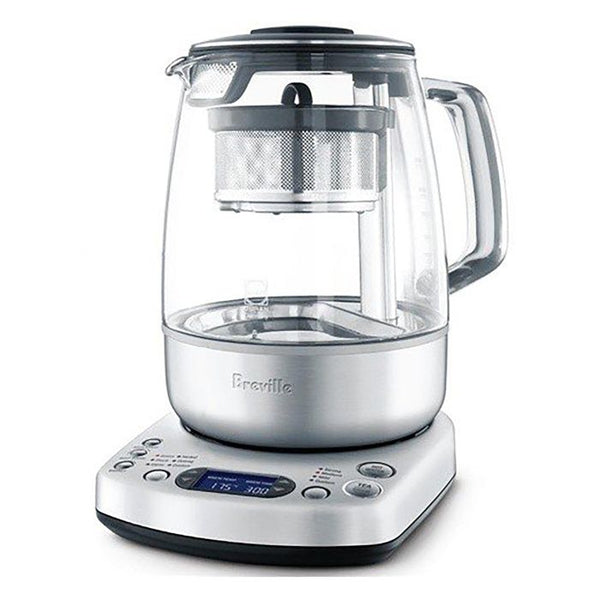
Breville One-Touch Tea Maker
View Product Page|Breville_Tea_Maker_BTM800_User_Manual.pdf
Nothing can ruin the relaxation-inducing ritual of drinking tea like actually having to make it yourself. Watching the kettle boil and timing your brew so you get the perfect flavor is stressful — so let Breville's One-Touch Tea Maker take over to produce an excellent cup of tea at the touch of a button. Preset brew time is available for green tea, white tea, oolong tea, black tea and herbal tea. The glass carafe and stainless steel basket are long lasting for years of tea service.
Setup & First Use
Before using the Breville One-Touch Tea Maker for the first time, remove all packaging materials and promotional labels. The Tea Maker operates at 120V / 1500W. Place the power base on a flat, dry, heat-resistant surface with a minimum 8 inches of clearance on all sides from walls and heat-sensitive materials. Plug into a grounded 3-prong outlet.
First Use Flush
Wash the jug lid, tea basket, basket lid, and tea scoop in warm soapy water with a soft sponge. Rinse and dry thoroughly. Do not immerse the base of the glass jug, power base, power cord, or power plug in water at any time.
Without the tea basket installed, fill the glass jug to the water maximum mark (1500mL) and place securely on the power base. Fit the jug lid. Plug in the power cord — the LCD screen will illuminate. Press the temperature up arrow until the display reads 212°F, then press the HOT WATER|Cancel button to start the cycle. Once the water reaches 212°F, three beeps will sound. Discard the water. The Tea Maker is now ready to use.
Know Your Controls
- TEA TYPE button: Cycles through 5 preset tea varieties — Green (175°F / 3 min), White (185°F / 3 min), Oolong (195°F / 3 min), Herbal (205°F / 4 min), Black (212°F / 2 min).
- TEA STRENGTH button: Cycles through Mild, Medium, and Strong preset brew times.
- Left arrow buttons: Adjust brew temperature in 5°F increments from 120°F to 212°F (Custom mode).
- Right arrow buttons: Adjust brew time in 30-second increments up to 10 minutes.
- TEA|Cancel button: Starts the tea brewing cycle. Press to cancel.
- HOT WATER|Cancel button: Starts a water heating cycle without the basket. Press to cancel.
- BASKET button: Activates the auto lift-and-lower basket cycle during brewing, or manually lowers/raises the basket after brewing.
- KEEP WARM button: Holds the brewed tea or heated water warm for up to 60 minutes after the cycle completes.
- AUTO START button: Programs the Tea Maker to begin a brewing or heating cycle at a specific time.
Water and Tea Fill Levels
When brewing tea, fill the glass jug to the TEA MAX mark (1200mL / 41oz). Do not fill past this line. When using as a kettle without the basket, fill to the WATER MAX mark (1500mL / 51oz). Always fill to at least the MIN mark — operating without sufficient water will trigger the boil-dry protection and shut the machine off. Never fill with chilled water. Allow the machine to cool before refilling.
Tutorials & Training
Brewing Tea — Step by Step
Remove the glass jug from the power base and open the lid. Fill with the desired amount of water up to the TEA MAX line. Place the tea basket on a flat, dry surface and remove the basket lid by lifting from the sides. Using the included tea scoop, fill the basket with loose leaf tea — one scoop per cup (approx. 8oz / 250mL) of water as a starting guide. Replace the basket lid and slide the assembled basket onto the magnetic post inside the glass jug. The basket attaches magnetically and hangs at the top. Replace the jug lid and return the jug to the power base.
Press the TEA TYPE button to select your tea variety, then press TEA STRENGTH to choose Mild, Medium, or Strong. The LCD will display the recommended temperature on the left and brew time on the right. Press TEA|Cancel to start. The water heats to your selected temperature, the basket automatically lowers into the water, and the countdown begins. When the brew time ends, the basket rises automatically, three beeps sound, and the Tea Maker enters Time Since Brew mode — counting up to 60 minutes to monitor freshness.
Water to Tea Ratio
- 500mL (approx. 2 cups / 16oz) — 2 scoops
- 750mL (approx. 3 cups / 24oz) — 3 scoops
- 1000mL (approx. 4 cups / 32oz) — 4 scoops
- 1200mL (approx. 5 cups / 40oz) — 5 scoops
Preset Tea Temperatures
- Green — 175°F: Prevents scalding the delicate leaves that produces bitterness at higher temperatures.
- White — 185°F: Preserves the subtle, slightly sweet character of white tea.
- Oolong — 195°F: Suited to oolong's semi-oxidized, floral nature.
- Herbal — 205°F: High heat extracts the best from flowers, roots, and herbal blends.
- Black — 212°F: Full boil for robust black teas, English Breakfast, Earl Grey, and similar blends.
These are starting points. Brew time and amount of tea have as much impact on flavor as temperature. Use the strength setting and brew time arrows to fine-tune to your preference.
Customizing Temperature and Time
The left arrow buttons override the preset tea type temperature and engage Custom mode — adjustable in 5°F increments from 120°F to 212°F. The right arrow buttons adjust brew time in 30-second increments up to 10 minutes. For brews over 10 minutes, continue pressing the time up arrow past 10 minutes until the display shows MANUAL LIFT — the basket will lower when water reaches temperature but will not auto-rise, letting you lift it manually when ready by holding the BASKET button for 2 seconds. Custom temperature and time settings are saved in memory until you change them. To restore factory defaults, press and hold AUTO START and KEEP WARM simultaneously for 2 seconds.
Basket Cycle Feature
Pressing the BASKET button once during a brewing cycle activates the auto lift-and-lower basket cycle. The basket gently rises and lowers continuously, allowing water to circulate freely through the tea leaves for more even, thorough extraction. This feature increases infusion rate and can produce a stronger brew — consider reducing brew time when using it. It is recommended only when brewing 1000–1200mL (4–5 cups). Press the BASKET button again at any time to stop the cycle and return the basket to the bottom of the jug.
Keep Warm
Press the KEEP WARM button before, during, or after a brewing or heating cycle to hold temperature for up to 60 minutes. Keep Warm temperature depends on the original brew temperature selected — brews at 195°F or above hold at approximately 175°F. Note that the tea will continue to develop flavor while the basket is raised and Keep Warm is active, so if using Keep Warm for an extended period, consider reducing your initial brew time. Removing the jug from the power base will turn off Keep Warm automatically.
Auto Start
To program the Tea Maker to start automatically at a specific time, first select your tea type and strength, then press and hold the AUTO START button until the clock symbol appears and the time fields begin blinking. Use the left arrow buttons to set the current time and the right arrow buttons to set the start time, then press either TEA|Cancel or HOT WATER|Cancel to confirm which function will activate. Make sure the jug has sufficient water and the basket is loaded with tea before the programmed time arrives.
Using as a Variable Temperature Kettle
Remove the tea basket before heating water for other purposes. Use the left arrow buttons to select your desired temperature (adjustable from 120°F to 212°F in 5°F increments) and press HOT WATER|Cancel to start. The BASKET button and basket cycle feature are not available in kettle mode.
Cleaning & Maintenance
Important Safety Note
Always press TEA|Cancel or HOT WATER|Cancel to switch the Tea Maker off and unplug from the wall before cleaning. Allow all parts to cool completely. Never immerse the base of the glass jug, the power base, the power cord, or the power plug in water. Do not use chemicals, steel wool, or abrasive cleaners on any part of the glass jug.
After Every Use
Empty the glass jug after each use — do not allow brewed tea to stand overnight. Wipe the interior with a soft damp sponge or rinse with warm water. Tea deposits on the interior can actually enhance flavor over time, so if using exclusively as a tea maker, do not wash with soap. Wipe the exterior of the glass jug with a soft damp cloth only — do not rinse the exterior under running water. Wipe the power base with a soft damp sponge.
Jug Lid and Integrated Scale Filter
Wash the jug lid in warm soapy water with a soft sponge, then rinse and dry. The integrated scale filter can be cleaned by holding it under hot running water and scrubbing gently with a cloth or brush. The jug lid is dishwasher safe — position it vertically with the scale filter facing upward so water drains properly.
Tea Basket, Basket Lid, and Tea Scoop
Wash in warm soapy water with a soft sponge, rinse, and dry thoroughly. A non-abrasive liquid cleanser applied to the sponge (not directly to the surfaces) can help prevent stain buildup. All three are dishwasher safe.
Removing Tannin Stains
Regular tea brewing will eventually leave tannin staining on the interior of the glass jug. To remove stains without a commercial cleaner, fill the jug to 1500mL with water and add one of the following: the juice of one lemon (plus the lemon), 2 tablespoons of baking soda, or 6 tablespoons of white vinegar. Select 212°F and press HOT WATER|Cancel to boil. Allow to cool — for best results, soak overnight. Discard the solution, scrub gently with a soft non-metallic brush, then fill with clean water, boil again, and discard. Repeat the clean water rinse before using.
Descaling
In areas with hard water, scale buildup on the interior of the glass jug and heating element is normal over time. Use a commercial descaling agent and follow the product's instructions. Regular descaling maintains performance and helps extend the life of the appliance. Tannin stain removers do not remove scale — these are separate processes.
Troubleshooting
Tea Maker Will Not Switch On
Check that the power plug is firmly inserted into a grounded outlet. Try a different outlet or reset the circuit breaker if needed. The Tea Maker has a thermal cutout that will automatically shut down in the event of severe overheating — if this has occurred, the machine will not restart until it has cooled. If the problem persists, contact Breville at 866-273-8455.
Tea Maker Will Not Operate After Powering On
Confirm the glass jug is fully and securely seated on the power base. The machine will not start a cycle if the jug is not properly positioned.
LCD Screen Has Gone Dark
The Tea Maker enters standby mode after 3 minutes of inactivity, and the LCD turns off. To wake it, remove and replace the glass jug on the power base, or press any button other than TEA|Cancel or HOT WATER|Cancel. Pressing TEA|Cancel or HOT WATER|Cancel while in standby will immediately start the respective cycle.
LCD Displays "RESET"
A flashing RESET message indicates a resettable electronic issue. Lift the glass jug off the power base and replace it, or unplug the power cord, wait 5 seconds, and plug back in. If RESET continues to display, contact Breville at 866-273-8455.
LCD Displays "ERROR"
A flashing ERROR message indicates a non-resettable issue with the appliance. Contact Breville Consumer Support at 866-273-8455 or visit breville.com.
Cannot Select a Function During a Cycle
Brew temperature cannot be changed once the heating cycle has started. To change temperature, press TEA|Cancel to cancel the cycle, reselect your desired temperature, then press TEA|Cancel again to restart. Brew time can be adjusted during the heating phase but not once steeping has begun.
Basket Cycle or BASKET Button Not Working
The BASKET button is only functional during a tea brewing cycle — it cannot be used when the machine is operating as a variable temperature kettle. During a tea cycle the BASKET button serves three purposes: activating the auto lift-and-lower cycle (single press), lowering the basket for extra infusion after the cycle ends (hold 2 seconds), and raising the basket after extra infusion (hold 2 seconds again).
Rattling Noise Inside the Glass Jug
This is normal. The sound comes from the magnet inside the jug post and may be heard when the tea basket is not attached.
Tea Tastes Too Weak or Too Strong
For stronger tea: increase the amount of tea per scoop, extend the brew time using the right arrow buttons, or select Strong on the TEA STRENGTH button. For weaker tea: reduce the amount of tea, shorten the brew time, or select Mild. Brew strength is also affected by finer tea particles, which infuse faster and release more tannin — if using bagged or finely ground tea, reduce brew time to avoid bitterness.
Still Need Help?
Contact Breville Consumer Support at 866-273-8455 or visit breville.com.
About Breville

About Breville
Brand warranty information
What it Covers: Breville espresso machines, grinders and blenders
Length: 2 Years (Covers Bambino Plus, Barista Pro, Barista Express Impress, Barista Touch, Barista Touch Impress, Dual Boiler, Dynamic Duo, Oracle, Oracle Touch, Oracle Jet, and Precision Brewers), 1 Year (Covers Bambino, Barista Express, Grind Control, Milk Cafe, and Smart Grinder Pro)
Who Supports the Warranty: Breville USA
Warranty Contact Information: 866-273-8455
Can SCG Repair? Yes (excluding Bambino models and grinders) Read more about our repair services.
Note: Please register your product with Breville for warranty support.