← Back to Brand Guides
Breville Grind Control Coffee Maker

Breville Grind Control Coffee Maker

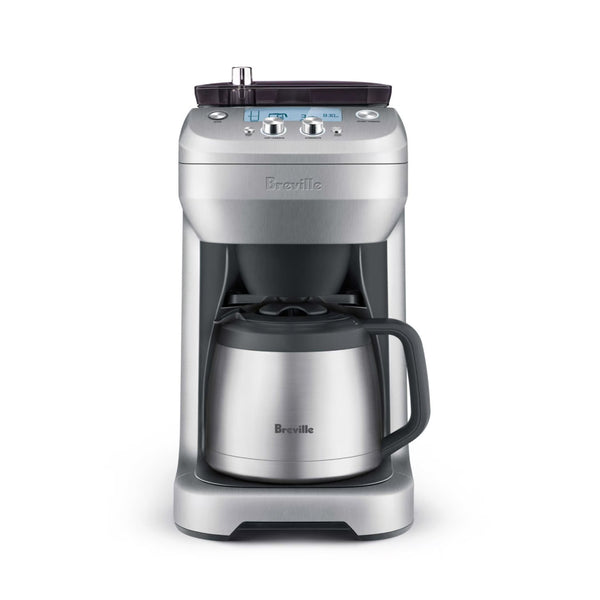
We all have a little bit of control freak in us (we aren't judging!) and Breville's newest iteration of their coffee maker, the Breville Grind Control, knows just how to channel it into something productive...delicious coffee! Tweak your grind, adjust the strength, and choose your volume to create the perfect cup. Oh, and did we mention the auto-start feature that will have you waking up to a fresh brew each morning? Suddenly 6am has never looked so good!

Warranty
1 Year Manufacturer Warranty
What's In The Box
Breville Grind Control (BDC650) coffee maker with integrated grinder, 12-cup double-wall stainless steel thermal carafe with lid, Removable gold tone filter, Cleaning brush for grinder burrs, Power cord

Setup & First Use

Before first use, wash the carafe, carafe lid, coffee basket, and gold tone filter with warm soapy water using a soft cloth. Do not use abrasive cleaners. Dry thoroughly. Wipe the exterior housing with a soft damp cloth.

Install the bean hopper: position it on the machine, press down, and turn the locking knob clockwise in the direction of the LOCK arrow until it clicks. Fill with fresh whole beans (maximum 0.5 lb / 227g). Replace the hopper lid. The grinder has 6 coarseness settings adjusted via the Grind Adjustment Knob below the hopper. Never overfill the hopper — too many beans can jam the grinder.

The Grind Control has two brewing modes: Carafe Mode (brews up to 12 cups into the thermal carafe) and Single Cup Mode (brews 1 cup using the removable drip tray). The gold tone filter is reusable — place it in the coffee basket before brewing. You can also use standard 8–12 cup flat base paper filters (approximately 3¼ inch base). Do not use both the gold tone filter and a paper filter simultaneously.

Set the clock using the MENU/EXIT button to enable the Auto Start function. The Auto Start button and CUP/CARAFE button allow you to program when and what the machine brews. The LCD screen shows grind setting, grind time, and cup count. The STRENGTH button selects from 8 strength levels (or PRE-GROUND if using pre-ground coffee with the grinder disabled).

Tutorials & Training

Carafe Mode — Brewing

Empty and seat the carafe under the brew head with the lid securely locked. Press CUP/CARAFE to select CARAFE. Rotate the STRENGTH button to your desired strength setting (1 = lightest, 8 = strongest) — or select PRE-GROUND to bypass the grinder. Press START/CANCEL to begin. The grinder runs just before brewing begins, grinding beans directly into the coffee basket. Brew Pause Drip Stop allows you to remove the carafe mid-brew for a quick pour — return it within 30 seconds to complete the brew without overflow.

Single Cup Mode

Remove the drip tray to access the single cup platform, which accommodates tall travel mugs and cups. Press CUP/CARAFE to select CUP. Select your strength and press START. The machine brews a single concentrated cup directly into the mug below.

Grind Settings

The Grind Adjustment Knob has 6 positions from coarse to fine. Start at the middle setting (3) and adjust based on brew speed and taste. A grind that is too fine causes over-extraction and a bitter, slow brew; too coarse produces a weak, fast brew. The grinder is integrated and grinds directly into the basket just before brewing — this is the key advantage of the Grind Control, capturing maximum freshness.

Auto Start

Press the Auto Start button to enable the auto start timer, set using the clock menu. With Auto Start on, the machine brews automatically at the programmed time — a significant convenience when the hopper is pre-loaded with beans the night before.

STRENGTH Settings

The 8 strength settings adjust the grind time (dose) to achieve lighter or stronger coffee. Higher settings dose more coffee; lower settings dose less. For most drip brewing with medium roast coffee, settings 4–6 are a good starting range. Adjust based on personal taste and bean density.

Using Pre-Ground Coffee

Set the STRENGTH button to PRE-GROUND to disable the grinder. Add pre-ground coffee directly to the gold tone filter or paper filter in the basket. Do not put pre-ground coffee in the bean hopper — this will clog the grinder.

Cleaning & Maintenance

Daily — After Each Brew

Remove and empty the coffee basket and gold tone filter. Rinse both under warm water. Hand-wash the carafe and carafe lid with warm soapy water using a soft cloth. Wipe the brew head area and grinds chute with a damp cloth. Do not use abrasive cleaners on any surface.

Weekly — Grinder Burrs

Unplug the machine. Remove the bean hopper. Use the included cleaning brush to sweep the burrs and coffee grinds chute. Do not use water inside the grinder area.

Monthly — Gold Tone Filter

Wash the gold tone filter thoroughly by hand or on the top rack of the dishwasher. Inspect for clogging — if the mesh is coated with oils, soak in warm soapy water for 10 minutes and rinse well.

Descaling

Descale when the machine prompts a descale cycle (indicated on the LCD) or when brew speed noticeably decreases. Use a Breville-approved descaling solution or a citric acid-based descaler. Follow the descaling procedure outlined in the Grind Control instruction book. Do not use vinegar. Run at least 3 rinse cycles after descaling before brewing.

Troubleshooting

Machine Won't Start or Displays 'LOCK BEAN HOPPER'

Ensure the bean hopper is seated and locked clockwise until it clicks. The LCD will flash this warning if the hopper is not properly locked, disabling operation as a safety measure.

No Coffee / Grinder Running But No Grounds

The hopper may be empty or the grinder may be jammed. Check the hopper level. If jammed, unplug the machine, remove the hopper, and use the cleaning brush to clear compacted grounds from the chute and burrs. Do not use pre-ground coffee in the hopper.

Coffee Too Weak

Increase the STRENGTH setting (higher number). If already at maximum strength, adjust the grind to a finer setting using the Grind Adjustment Knob.

Coffee Too Bitter or Strong

Reduce the STRENGTH setting or move the grind to a slightly coarser position.

Coffee Brewing Slowly

Descaling is likely needed — mineral buildup restricts water flow. Run a descale cycle. Also check that the gold tone filter or paper filter is not clogged with oils or residue.

Brew Pause Not Stopping Drips

The Brew Pause Drip Stop is designed for brief carafe removal only. Do not leave the carafe out for more than 30 seconds during brewing or drips may continue through the stop mechanism.

Warranty and Support

The Breville Grind Control carries a 1-year limited product warranty. For support, call 1-866-BREVILLE (1-866-273-8455) or visit breville.com.

Videos

Sneak Preview: Breville Grind Control

We got to take a sneak peak at the latest Drip Coffee Brewer from Breville, The Grind Control. And it is pretty cool. Watch the video to get a sneak peak at this machine before it hits our stores!

Ask Gail: Adjusting The Strength On The Breville Grind Control

You asked and Breville listened. Adjusting the strength on their latest drip brewer, the Grind Control, is so much easier than previous generations. Here's how you can adjust the flavor to your liking!

Ask Gail: Descaling The Breville Grind Control

How do you descale the Breville Grind Control? Gail and Miranda are here to answer! We all know that descaling is essential to keeping certain machines working well, but did you know each brand has it's preferred method? Here is how Breville recommended you descale their Grind Control.

Grind Control Single Serve Taste Test | CR Comparison

The Breville Grind control brews everything for you, from a pot of coffee to a single go cup. When in single serve mode, the Grind Control holds the water and grounds in the brew basket for the entire brew process. So we knew we would need to do a taste test!

Ask Gail: How To Calibrate The Breville Grind Control

The Breville Grind Control is one of the smartest drip coffee brewers out there. Allowing you to calibrate the dosing based on the coffee you are using (resulting in even better tasting coffee!). In this video, Gail and Miranda show you how!

YouBrew vs. Grind Control Pro
Breville Dose Control Pro Burr Grinder | Crew Review

Sixty different grind settings, adjustable burrs and a removable bean hopper make the Dose Control Pro one heck of a grinder! Tune in as Gail walks through Beville's newest coffee addition!

Breville Grind Control Coffee Maker | Crew Review

The latest coffee making machine from Breville, the Grind Control! We all know that the grind is arguably the most important step in any coffee preparation, so you might be able to tell why we love this machine! Watch as Gail reviews (and tastes) the coffee brewed off the Grind Control! Like this video? Show us with a thumbs up! Learn More About The Grind Control! Compare All Our Drip Coffee Brewers! See What Else Breville Has To Offer Need A Bag Of Fresh Coffee?

About Breville

Breville

About Breville

Breville’s range of espresso machines, drip brewers, and grinders seek to make gourmet coffee easier in the home. From the perfect starter espresso machine to smart, powerful brewers, Breville brings something for everyone. Founded in 1932, Breville is known for producing espresso machines, drip brewers, and grinders that embrace usability without sacrificing performance.
Brand warranty information

What it Covers: Breville espresso machines, grinders and blenders

Length: 2 Years (Covers Bambino Plus, Barista Pro, Barista Express Impress, Barista Touch, Barista Touch Impress, Dual Boiler, Dynamic Duo, Oracle, Oracle Touch, Oracle Jet, and Precision Brewers), 1 Year (Covers Bambino, Barista Express, Grind Control, Milk Cafe, and Smart Grinder Pro)

Who Supports the Warranty: Breville USA

Warranty Contact Information: 866-273-8455

Can SCG Repair? Yes (excluding Bambino models and grinders) Read more about our repair services.

Note: Please register your product with Breville for warranty support.

Back To Breville Guides Shop Breville