← Back to Brand Guides
Breville Dose Control Espresso Grinder

Breville Dose Control Espresso Grinder

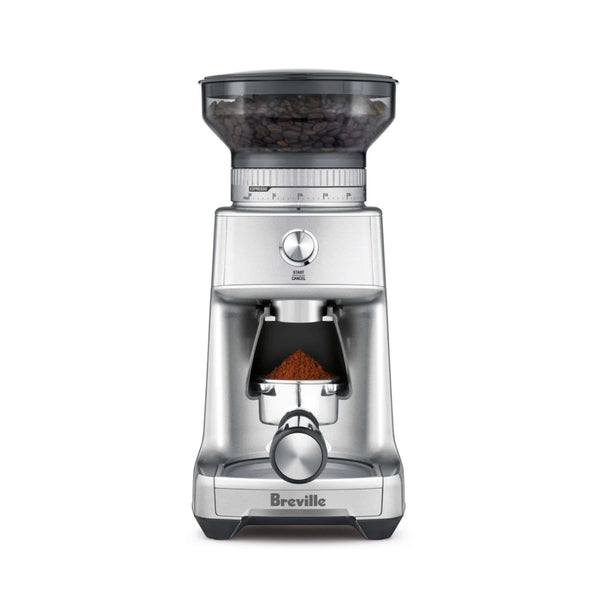
Beginning Baristas rejoice! The Breville Dose Control offers an affordable entry into espresso grinding perfect for those new to the craft. Equipped with an easy-adjusting conical steel burrset and simple on/off grind controls, the Dose Control comes with everything you need to get brewing with your first espresso machine. Simple stepped grind adjustments and included 54mm and 58mm portafilter hooks make this grinder a great match for most common entry-level espresso machines.

Warranty
1 Year Manufacturer Warranty
What's In The Box
Breville Dose Control (BCG400) coffee grinder, Bean hopper with lid (3/4 lb capacity), Portafilter cradle 50–54mm, Portafilter cradle 58mm, The Razor adjustable dose trimming tool, Cleaning brush, Power cord

Setup & First Use

Before first use, wash the bean hopper, hopper lid, and portafilter cradles with warm soapy water. Dry thoroughly. Wipe the grinder exterior with a soft damp cloth. Place on a flat, level surface and plug into a 120V outlet.

Align the tabs on the base of the bean hopper with the grinder housing and press down. Turn the hopper clockwise until it clicks and locks — the grinder will not operate if the hopper is not locked. Fill with fresh whole beans and secure the lid.

The Dose Control has 60 grind settings adjusted by rotating the hopper (which turns the internal Grind Size Collar). Setting 1 is finest (espresso); setting 60 is coarsest (French press). For espresso, start in the 1–25 range. The GRIND TIME dial controls how long the grinder runs, which determines dose. Turn clockwise to increase grind time (more coffee), counterclockwise to decrease. Season new burrs by grinding and discarding 30–50g of whole beans before dialing in.

Tutorials & Training

Grinding for Espresso

Insert the 50–54mm or 58mm portafilter cradle under the grind outlet, matching your portafilter size. Insert your portafilter into the cradle. Set the grind size to approximately setting 12 as a starting point for espresso. Set grind time with the GRIND TIME dial to achieve your target dose (typically 7–11g for a single, 14–18g for a double). Press START to grind. After dosing, tamp firmly and use the Razor trimming tool to verify the dose level.

The Razor Dose Trimming Tool

The Razor has three blade widths: 58mm, 54mm, and 50mm. Select the blade matching your portafilter basket diameter using the adjustment dial. After tamping, insert the Razor into the basket rim — the blade should just penetrate the surface of the tamped coffee. Rotate back and forth to trim the excess. If the blade does not reach the coffee, your dose is too low — increase grind time. If the blade leaves too deep an imprint, reduce grind time.

Grinding for Filter Coffee

Remove the portafilter cradle by sliding it out. Place your filter basket, drip filter, or grinds container directly under the grind outlet. Select grind settings 26–60 for filter brewing: percolator 26–35, drip with paper filter 35–48, French press 50–60. Adjust grind time to achieve your desired dose.

Adjustable Upper Burr

If the standard 60-setting range isn't sufficient for a specific bean, the upper burr can be repositioned to extend the fine end of the range. Make one adjustment at a time and test before further adjustments. Full instructions are in the Dose Control instruction book.

Grind Adjustments

Adjust grind size with the grinder running — turning the hopper while beans are in the burrs can damage the adjustment mechanism on some grinders. Make changes between shots, not during.

Cleaning & Maintenance

Weekly — Brush the Burrs

Unplug the grinder. Remove the hopper. Use the included cleaning brush to sweep the ring burr, grinding chamber walls, and grounds outlet. Do not wash the burrs or internal chamber with water.

Monthly — Hopper and Cradles

Hand-wash the hopper, hopper lid, and portafilter cradles with warm soapy water. Rinse thoroughly and dry completely before reinstalling.

Quarterly — Grinder Cleaning Tablets

Run a cycle of grinder cleaning tablets (Grindz or equivalent) through the grinder at a medium setting to remove coffee oil buildup. Follow with 30g of actual beans to purge tablet residue.

Troubleshooting

Grinder Won't Start

Ensure the bean hopper is locked into position — the grinder will display a warning and disable operation if the hopper is not properly locked. Confirm the power cord is connected and the outlet is live.

Grind Too Coarse / Weak Extraction

Move to a finer grind setting. For espresso, start in the espresso range (settings 1–25) and adjust in 1–2 setting increments. Pull a test shot after each adjustment.

Grind Too Fine / No Flow

Move to a coarser grind setting. If the portafilter is completely blocked, jump 3–4 settings coarser and work back in.

Grinder Jammed

Turn off and unplug. Remove the hopper and check for foreign objects. Clear any compacted grounds from the burrs and chute using the included cleaning brush. Never use water inside the grinding chamber.

Inconsistent Dose

Adjust the grind time dial to increase or decrease dose. Pull the portafilter activation switch or press START to test the current dose, then fine-tune the grind time. Verify the bean hopper is adequately filled — a near-empty hopper affects feed consistency.

Warranty and Support

Breville grinders carry a 1-year limited product warranty. For support, call 1-866-BREVILLE (1-866-273-8455) or visit breville.com.

About Breville

Breville

About Breville

Breville’s range of espresso machines, drip brewers, and grinders seek to make gourmet coffee easier in the home. From the perfect starter espresso machine to smart, powerful brewers, Breville brings something for everyone. Founded in 1932, Breville is known for producing espresso machines, drip brewers, and grinders that embrace usability without sacrificing performance.
Brand warranty information

What it Covers: Breville espresso machines, grinders and blenders

Length: 2 Years (Covers Bambino Plus, Barista Pro, Barista Express Impress, Barista Touch, Barista Touch Impress, Dual Boiler, Dynamic Duo, Oracle, Oracle Touch, Oracle Jet, and Precision Brewers), 1 Year (Covers Bambino, Barista Express, Grind Control, Milk Cafe, and Smart Grinder Pro)

Who Supports the Warranty: Breville USA

Warranty Contact Information: 866-273-8455

Can SCG Repair? Yes (excluding Bambino models and grinders) Read more about our repair services.

Note: Please register your product with Breville for warranty support.

Back To Breville Guides Shop Breville