← Back to Brand Guides
Eureka Atom W 75 Espresso Grinder

Eureka Atom W 75 Espresso Grinder

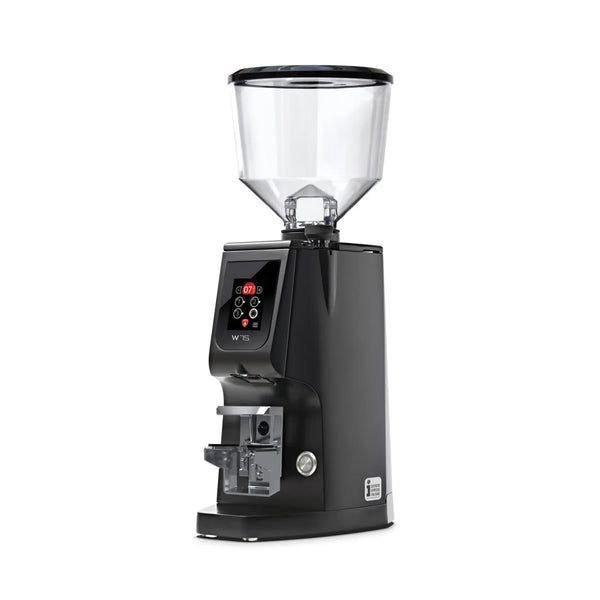
Take a load off your espresso preparation with the Eureka Atom W Espresso Grinder. Built on the sound-insulated Atom platform, the Atom W brings quick, quiet grinding, dose by weight consistency, and commercial build quality to your espresso setup. Equipped with hardened steel 75mm burrs and a stepless grind adjust, dialing-in excellent espresso is easier than ever. Other niceties like a hands-free portafilter holder, vibrant color touchscreen, and 3 weight-programmable dose options round out the design for a grinder suitable for home coffee setups and commercial cafes alike.

Warranty
1 Year Seattle Coffee Gear Warranty
What's In The Box
Eureka Atom W 75 grinder, Short hopper with lid, Portafilter rest (adjustable), Power cable

Setup & First Use

Before using the Eureka Atom W 75 for the first time, remove all packaging materials and inspect the grinder for any shipping damage. Place the grinder on a flat, stable surface capable of supporting its weight. The Atom W 75 operates at 110/120V, 430W, and should only be used by a responsible adult. Do not use adapters, multi-outlet strips, or extension cables.

Assembling the Grinder

Place the hopper into its seat on top of the grinder. Before adding coffee beans, ensure the rotating metal tab on the hopper is in the closed position — this prevents beans from flowing into the burr chamber prematurely. Adjust the portafilter rest (fork) to fit the height of your portafilter for hands-free dosing. The fork supports all standard portafilter sizes.

Powering On

Connect the power cable and press the power button (7) on the front right side of the chassis. At first startup the grinder will load in factory default mode; on all subsequent startups it will resume the last mode used before shutdown. The touch screen display will illuminate showing the current operating screen.

Loading Beans and First Dose

Fill the hopper with whole bean coffee, then pull the bean container tab (3) to the open position to allow beans to flow into the grinder neck. Select a dose using the dose buttons on the display, set your target gram weight using the + and − buttons, and place the portafilter on the fork. The grinder will automatically dispense and stop at the programmed weight. Do not make any grind adjustment until after you have pulled your first shot and can evaluate the result.

Tutorials & Training

Understanding the Display and Dosing

The Atom W 75 uses a grind-by-weight system controlled via a touch screen display. Review the user manual for the layout of this screen display.

Three programmable dose slots (Dose 1, Dose 2, Dose 3) are available. Select a dose button, then use the + and − buttons to set the target gram weight. Place the portafilter on the fork and the grinder dispenses automatically, stopping at the programmed weight. The display screen turns red when grinding by weight is active.

Continuous Dispensing Mode

For continuous grinding without a preset dose target, select the continuous dose button (I). Place the portafilter on the fork and hold the continuous dose button for the duration of the grind. Release to pause; press and hold again to continue. This mode is useful when flushing transition grinds after a grind adjustment.

Grinding by Time vs. Grinding by Weight

The Atom W 75 supports both grind-by-weight (default, red main screen) and grind-by-time (green main screen) modes. Switch between them via the Grinding Mode screen in the menu. For most espresso use, grind-by-weight delivers the most consistent results.

Adjusting Grind Size

The grind size is controlled by the adjustment knob (4) on the top of the machine. The adjustment is stepless and infinitely variable — the numbers are reference points only, not fixed stops, and the dial can rotate 360° multiple times. Turning clockwise makes the grind finer; turning counter-clockwise makes it coarser.

For espresso, make small adjustments — no more than a quarter to half a number at a time — as the mechanism is very sensitive. After each adjustment, run 2–3 doses to clear transition grinds from the burr chamber before evaluating the shot. When moving from fine to coarse (espresso to filter), the motor does not need to be running. When moving from coarse back to fine — or making any large adjustment toward finer — run the motor while turning to avoid jamming the burrs. If coffee stops flowing, turn the dial counter-clockwise to open the burr gap.

Setup Menu and Dose Calibration

To program dose weights, select a dose button then use the + and − buttons to adjust dispensing time in increments of 0.05 seconds. The setup menu also allows adjusting display brightness, standby timing, dose selection mode, language, and factory reset. To access the technical menu, use the technical menu button (L) on the display.

Filter Holder Fork Calibration

If dose weights are drifting, the portafilter fork scale may need recalibration. Press and hold the calibration key for 3 seconds to enter the calibration menu. Use the + and − keys to set the sample weight, then confirm to save. This ensures the grind-by-weight system is accurately reading the portafilter load.

Cleaning & Maintenance

Important Safety Note

Always disconnect the grinder from the power supply before performing any cleaning or maintenance. Do not pull the power cable or the machine body to unplug — handle the plug directly. Do not use water jets or liquid detergents on the machine body or grinding system. All cleaning products used must be approved for food contact use.

Important: Do Not Leave the Portafilter on the Fork

Do not leave the portafilter inserted on the fork (8) when the grinder is not in use. This can cause the scale to drift and affect dosing accuracy.

Bean Container — At Least Weekly

Remove the bean container from the machine. Wash the inside with water and neutral soap to remove the oily residue left behind by coffee beans. Rinse thoroughly and dry completely. Repeat the same process for the plastic lid. Do not wash the container in the dishwasher. Reinstall only when fully dry.

Grinding System — As Needed

Remove the hopper, then clean the burrs and other internal parts using a brush or a dry cloth. If needed, a vacuum cleaner or a jet of compressed air can be used to remove fine grounds from hard-to-reach areas. Once clean, replace the hopper. For more thorough sanitisation, use grinder cleaning tablets or other products approved for food contact use.

Burr Replacement — Every 500 kg of Coffee

To maintain consistent grind quality, inspect the burrs regularly and replace them approximately every 500 kg of coffee ground. To access the burrs for cleaning or replacement, disconnect the machine from the power supply and remove the bean container. Loosen the lid screw and the screws securing the upper burr holder, then clean the burrs with a brush or dry cloth. Burr replacement must be carried out by qualified personnel authorized by the manufacturer. For service, contact us.

Troubleshooting

Espresso Extracting Too Fast / Thin or Watery

The grind is too coarse. Turn the adjustment knob clockwise in small increments (a quarter to half a number at a time). Run 2–3 doses to flush transition grinds before pulling a shot to evaluate. Also confirm the dose weight is set correctly — an underweight dose will produce a fast, underdeveloped shot regardless of grind setting.

Espresso Extracting Too Slowly / Dense or Bitter

The grind is too fine. Turn the adjustment knob counter-clockwise in small increments. Run transition grinds between each adjustment before pulling another shot. If you have recently switched to a different coffee with a different roast level, a grind adjustment is expected and normal.

Grinder Is Jammed / Burrs Not Turning

This most commonly occurs when the adjustment knob is turned significantly toward the fine end with the motor off. Do not force the knob. Switch off and unplug the machine, then turn the knob counter-clockwise several positions to open the burr gap before attempting to restart. If the machine does not recover, do not attempt to disassemble or repair it yourself — all maintenance must be carried out by authorized personnel. Contact us for service.

Dose Weight Is Inconsistent

Check that the portafilter was not left sitting on the fork when the grinder was not in active use — leaving it in place can affect the fork scale calibration. Recalibrate the fork scale if needed by holding the calibration key for 3 seconds and following the on-screen steps. Also ensure the bean container is clean and free of oily buildup, which can affect bean flow and grind consistency.

Coffee Not Flowing / Flow Stopped Mid-Dose

If coffee stops dispensing, the burr gap may be too tight or grounds may be compacted in the burr chamber. Turn the adjustment knob counter-clockwise to open the gap and free any lodged grounds. If the issue persists, remove the hopper, clean the grinding system with a brush and if necessary compressed air, then reassemble. Do not insert tools or foreign objects into the bean container or outlet nozzle.

Display Not Responding / Grinder Not Starting

Confirm the power button has been pressed and the display is illuminated. Check that the cable is fully connected and the outlet is functioning. If the problem persists, switch off, unplug, and contact us for support.

Still Need Help?

Contact Seattle Coffee Gear for assistance.

Videos

What is the difference between Eureka Atom W 65 and W 75?

Meet the New Eureka Atom W Series... Say hello to the Eureka Atom W 65 and Atom W 75 – two precision weight-based espresso grinders built for coffee lovers who want commercial-level performance right at home. With grind-by-weight technology, consistent dosing, and the optimal workflow the Atom line is known for, these grinders are ready to elevate your coffee bar. Whether you’re dialing in for a single-origin espresso or brewing back-to-back cappuccinos, both of the Atom W espresso grinders delivers speed, precision, and that extra touch of Eureka engineering that espresso enthusiasts can’t get enough of. 💬 We want to hear from you! Drop a comment below with your specific questions about these grinders so we can answer them in future videos.

About Eureka

Eureka

About Eureka

Eureka’s selection of grinders offer superior performance and grind quality. Designed in Florence, Italy, Eureka’s home and commercial grinders bring phenomenal coffee to the comfort of your kitchen. Powerful burrs in a variety of sizes and configurations provide high quality grounds that will enhance your brewing on any machine. Discover a full catalog of Eureka brewers and step up your coffee game today.
Brand warranty information

What it Covers: Eureka Grinders

Length:

  • Home Use: 1 year parts and labor
  • Commercial Use: 1 year parts and labor

Warranty Point of Contact: Seattle Coffee Gear, read more about Seattle Coffee Gear's Warranty coverage.

Contact Information: 866-372-4734 or email us at service@seattlecoffeegear.com

Eligible for SCG Extended Warranty? No

Can SCG Repair? Yes, read more about our repair services

Back To Eureka Guides Shop Eureka