← Back to Brand Guides
Eureka Mignon Libra Espresso Grinder

Eureka Mignon Libra Espresso Grinder

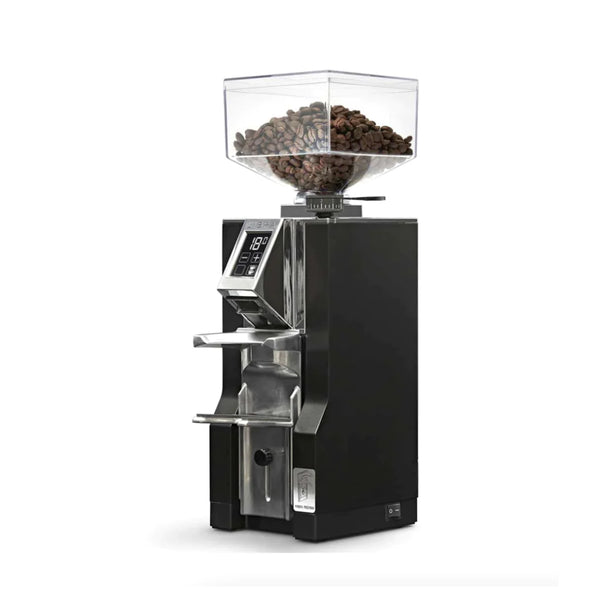
Do a little less work and drink a little more espresso with the Eureka Mignon Libra Espresso Grinder. Eureka's first grinder designed to dose by weight, the Libra offers some of the best workflow around thanks to its accurate dosing, 55mm burrset, and one-touch operation. A load sensor in the adjustable portafilter holder lets you program the Libra to your desired amount of grams, and operates at a touch of the screen. Inside you'll find a bevy of further labor-saving features like a dosing funnel for a cleaner countertop, a stepless bottom burr grind adjust, and motor and outlet insulation for quieter, low vibration grinding.

Warranty
1 Year Seattle Coffee Gear Warranty
What's In The Box
Your Eureka Mignon Libra includes: Grinder unit, 300g bean hopper with lid, portafilter fork with integrated scale platform, 58mm dosing funnel, cleaning brush, and power cord. The Libra is Eureka's first grind-by-weight Mignon grinder.

Setup & First Use

Understanding the Libra's IGW Scale

The Libra features Eureka's patented Intelligent Weighing System (IGW)—a built-in scale integrated into the portafilter fork platform. Instead of timed dosing, the Libra stops grinding automatically when the target weight is reached (within ±0.2g accuracy). The anti-vibration design allows the scale to continue measuring accurately even if the grinder is bumped or knocked mid-dose.

Initial Setup

Attach the bean hopper and set the portafilter fork on the scale platform. Install the included 58mm dosing funnel on your portafilter basket for cleaner dosing—it guides grounds directly into the basket and is removable for pulling shots. The Libra's scale platform is the fork; placing the portafilter activates the weight measurement.

Setting Target Dose Weight

Use the touchscreen to set your target dose weight (adjustable in 0.1g increments). The Libra stores two programmable dose weights (Single and Double). Press the + or – buttons to adjust. Grind adjustment is stepless and controlled from the bottom burr knob as with other Mignons.

Tutorials & Training

Programming Dose Weights

Set your target dose weight on the touchscreen (typically 9g for single, 18g for double). Place your portafilter on the fork—the built-in scale tares automatically. Press the dose button; the Libra grinds until the target weight is reached and stops. The scale continues weighing even while grinding, stopping precisely at your target.

Using the Dosing Funnel

The included 58mm dosing funnel fits on your portafilter basket to catch any grounds that miss during dispensing. After grinding, remove the funnel before tamping and pulling your shot. The funnel is especially useful with fluffy grounds from the ACE system.

Grind Adjustment Without Dose Reprogram

Unlike timed grinders, the Libra's weight-based system doesn't need to be reprogrammed when you adjust grind size—the scale measures weight directly regardless of grind time. This is a major workflow advantage: adjust grind, pull a shot, no recalibration of the dose needed.

Removal During Grinding

A unique safety feature: if you remove the portafilter from the fork mid-dose, the Libra stops grinding immediately. This prevents grounds from spilling freely and protects your workflow.

Cleaning & Maintenance

Daily Cleaning

Brush the chute and fork area daily. The dosing funnel can be rinsed and dried separately. Keep the scale platform on the portafilter fork free of grounds buildup—accumulated coffee grounds under the fork platform can affect scale readings.

Scale Calibration

The IGW scale is factory-calibrated. If dose accuracy drifts significantly beyond the ±0.2g specification, recalibrate the scale through the touchscreen settings menu. Contact Seattle Coffee Gear if calibration cannot be restored.

Burr Cleaning

Remove the top burr for periodic cleaning (grind setting preserved by bottom burr adjust). Brush clean and run Grindz monthly.

Troubleshooting

Dose Weight Consistently Off Target

If the Libra consistently over- or under-doses by more than 0.5g, check for grounds buildup under the portafilter fork platform that may be affecting the scale. Clean the platform area and recalibrate via the touchscreen if needed.

Grinder Not Stopping at Target Weight

The Libra pre-programs a small offset to account for grounds in flight when it stops the motor. If shots are consistently under or over target, the motor-stop offset may need adjustment through the settings menu. Very fluffy or dense grounds can affect this—reprogram after switching coffees.

About Eureka

Eureka

About Eureka

Eureka’s selection of grinders offer superior performance and grind quality. Designed in Florence, Italy, Eureka’s home and commercial grinders bring phenomenal coffee to the comfort of your kitchen. Powerful burrs in a variety of sizes and configurations provide high quality grounds that will enhance your brewing on any machine. Discover a full catalog of Eureka brewers and step up your coffee game today.
Brand warranty information

What it Covers: Eureka Grinders

Length:

  • Home Use: 1 year parts and labor
  • Commercial Use: 1 year parts and labor

Warranty Point of Contact: Seattle Coffee Gear, read more about Seattle Coffee Gear's Warranty coverage.

Contact Information: 866-372-4734 or email us at service@seattlecoffeegear.com

Eligible for SCG Extended Warranty? No

Can SCG Repair? Yes, read more about our repair services

Back To Eureka Guides Shop Eureka